
Image Storage Architecture with Supabase
Introduction
Every modern application eventually faces the same challenge: where do you store user-uploaded images? The naive approach of dumping files into a single folder works until you hit 10,000 images and your file listings timeout. Add requirements for access control, image resizing, and global delivery, and suddenly image storage becomes a serious architectural decision.
Supabase Storage offers an elegant solution built on familiar foundations. Under the hood, it’s S3-compatible object storage with PostgreSQL-powered access control. This means you get the scalability of cloud object storage combined with the expressive power of Row Level Security (RLS) policies you already know from Supabase’s database layer.
In this article, we’ll build a production-ready image storage architecture. We’ll cover bucket organization strategies, secure upload patterns from Node.js, on-the-fly image transformations, and CDN integration. By the end, you’ll have a blueprint for handling everything from user avatars to high-resolution product galleries.
Understanding Supabase Storage fundamentals
Supabase Storage is built on three core concepts: buckets, objects, and policies. Understanding how these interact is essential for designing a scalable architecture.
Buckets as logical containers
A bucket is a top-level container for organizing files. Think of it like a root folder with special properties:
// Supabase bucket configuration optionsinterface BucketConfig {  id: string;           // Unique bucket name (no spaces, lowercase)  public: boolean;      // Whether objects are publicly accessible  allowedMimeTypes?: string[];  // Restrict file types  fileSizeLimit?: number;       // Max file size in bytes}
// Example bucket configurationsconst buckets = {  avatars: {    id: 'avatars',    public: true,        // Avatars are publicly viewable    allowedMimeTypes: ['image/jpeg', 'image/png', 'image/webp'],    fileSizeLimit: 2 * 1024 * 1024  // 2MB  },  documents: {    id: 'documents',    public: false,       // Documents require authentication    allowedMimeTypes: ['application/pdf', 'image/*'],    fileSizeLimit: 10 * 1024 * 1024  // 10MB  },  media: {    id: 'media',    public: false,       // Private by default, signed URLs for access    fileSizeLimit: 50 * 1024 * 1024  // 50MB  }};
💡 Pro Tip: Create separate buckets for different access patterns rather than mixing public and private files. This simplifies policy management and prevents accidental exposure.
Public vs private bucket strategies
The choice between public and private buckets has significant implications:
| Aspect | Public Bucket | Private Bucket |
|---|---|---|
| Access | Direct URL, no auth needed | Requires signed URL or RLS policy |
| Caching | Full CDN caching | Limited caching with signed URLs |
| Use case | Avatars, logos, public assets | User documents, private media |
| URL format | storage.supabase.co/.../public/... | Signed URL with expiry token |
Setting up Supabase client for storage operations
Before uploading files, you need a properly configured Supabase client. The configuration differs between client-side and server-side contexts.
Server-side client with service role
For Node.js backend operations, use the service role key for full storage access:
import { createClient } from '@supabase/supabase-js';
// Server-side client with elevated privileges// NEVER expose SUPABASE_SERVICE_ROLE_KEY to the clientconst supabaseAdmin = createClient(  process.env.SUPABASE_URL!,  process.env.SUPABASE_SERVICE_ROLE_KEY!,  {    auth: {      autoRefreshToken: false,      persistSession: false    }  });
export { supabaseAdmin };
Client-side with user context
For browser uploads, use the anon key with user authentication:
import { createClient } from '@supabase/supabase-js';
// Client-side with RLS enforcementconst supabase = createClient(  process.env.NEXT_PUBLIC_SUPABASE_URL!,  process.env.NEXT_PUBLIC_SUPABASE_ANON_KEY!);
export { supabase };
⚠️ Warning: The service role key bypasses RLS policies entirely. Only use it in trusted server environments, never in client-side code or edge functions that could expose the key.
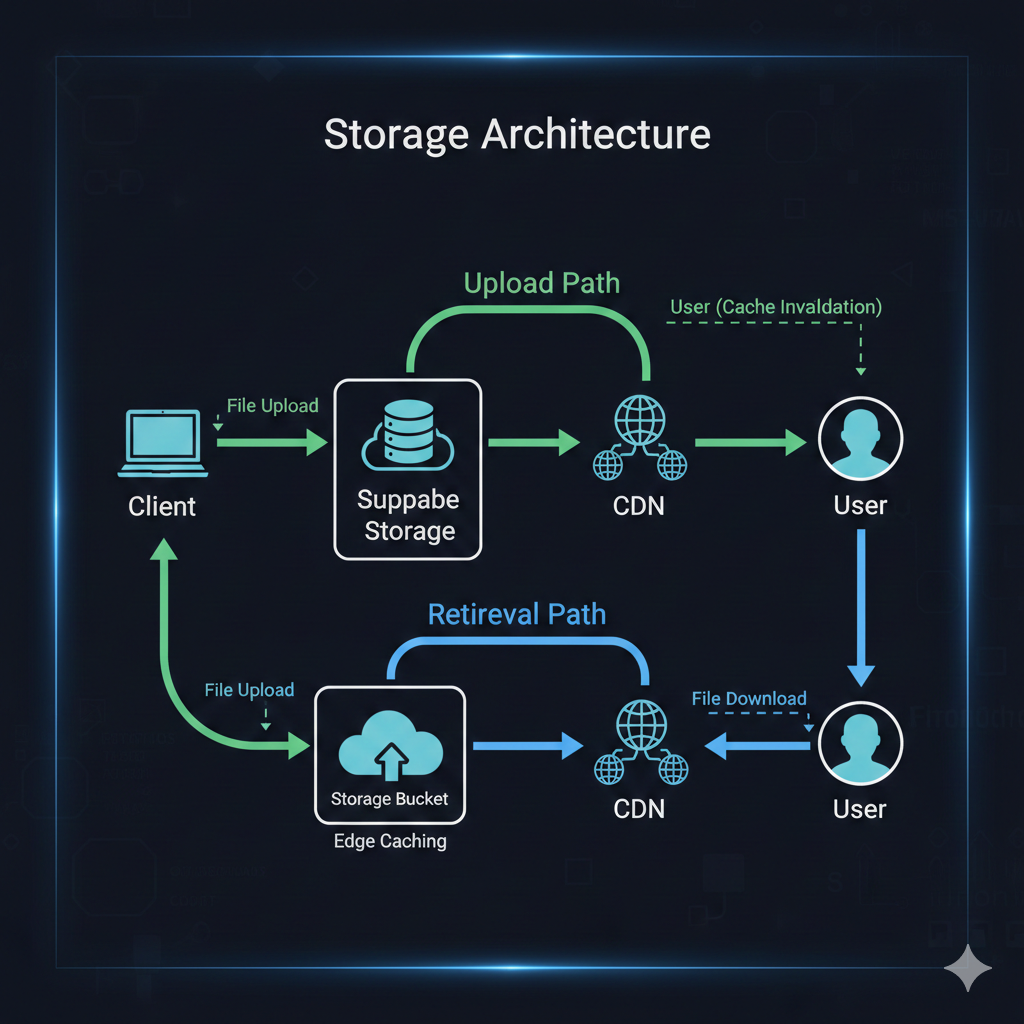
Implementing structured upload patterns
A well-designed path structure makes files discoverable, enables efficient policies, and prevents collisions. Here’s a pattern that scales:
Path structure design
bucket/├── {user_id}/│ ├── avatars/│ │ └── profile.jpg│ ├── uploads/│ │ ├── 2026/│ │ │ ├── 01/│ │ │ │ ├── receipt-abc123.pdf│ │ │ │ └── photo-def456.jpg│ │ │ └── 02/│ │ │ └── ...│ └── exports/│ └── report-2026.pdf└── shared/ └── templates/ └── invoice-template.pdfComplete upload service
import { supabaseAdmin } from '../lib/supabase-admin';import { v4 as uuidv4 } from 'uuid';import path from 'path';
interface UploadOptions {  bucket: string;  userId: string;  file: Buffer;  fileName: string;  contentType: string;  folder?: string;}
interface UploadResult {  path: string;  publicUrl: string | null;  signedUrl?: string;}
export class StorageService {  /**   * Upload a file with structured path and collision prevention   */  async uploadFile(options: UploadOptions): Promise<UploadResult> {    const { bucket, userId, file, fileName, contentType, folder = 'uploads' } = options;
    // Generate unique filename to prevent collisions    const ext = path.extname(fileName);    const baseName = path.basename(fileName, ext);    const uniqueId = uuidv4().slice(0, 8);    const safeFileName = `${this.sanitizeFileName(baseName)}-${uniqueId}${ext}`;
    // Structure: userId/folder/YYYY/MM/filename    const now = new Date();    const year = now.getFullYear();    const month = String(now.getMonth() + 1).padStart(2, '0');    const filePath = `${userId}/${folder}/${year}/${month}/${safeFileName}`;
    // Upload with proper content type    const { data, error } = await supabaseAdmin.storage      .from(bucket)      .upload(filePath, file, {        contentType,        cacheControl: '3600',  // 1 hour cache        upsert: false          // Fail if exists (shouldn't with UUID)      });
    if (error) {      throw new Error(`Upload failed: ${error.message}`);    }
    // Get public URL if bucket is public    const { data: urlData } = supabaseAdmin.storage      .from(bucket)      .getPublicUrl(data.path);
    return {      path: data.path,      publicUrl: urlData.publicUrl    };  }
  /**   * Generate a signed URL for private file access   */  async getSignedUrl(bucket: string, path: string, expiresIn = 3600): Promise<string> {    const { data, error } = await supabaseAdmin.storage      .from(bucket)      .createSignedUrl(path, expiresIn);
    if (error) {      throw new Error(`Failed to generate signed URL: ${error.message}`);    }
    return data.signedUrl;  }
  /**   * Delete a file (with ownership verification)   */  async deleteFile(bucket: string, path: string, userId: string): Promise<void> {    // Verify the path belongs to this user    if (!path.startsWith(`${userId}/`)) {      throw new Error('Unauthorized: Cannot delete files owned by other users');    }
    const { error } = await supabaseAdmin.storage      .from(bucket)      .remove([path]);
    if (error) {      throw new Error(`Delete failed: ${error.message}`);    }  }
  /**   * Sanitize filename for safe storage   */  private sanitizeFileName(name: string): string {    return name      .toLowerCase()      .replace(/[^a-z0-9]/g, '-')      .replace(/-+/g, '-')      .replace(/^-|-$/g, '')      .slice(0, 50);  }}
export const storageService = new StorageService();
Express.js upload endpoint
import express from 'express';import multer from 'multer';import { storageService } from '../services/storage-service';import { validateJwt } from '../middleware/auth';
const router = express.Router();
// Configure multer for memory storageconst upload = multer({  storage: multer.memoryStorage(),  limits: {    fileSize: 10 * 1024 * 1024  // 10MB limit  },  fileFilter: (req, file, cb) => {    const allowedTypes = ['image/jpeg', 'image/png', 'image/webp', 'application/pdf'];    if (allowedTypes.includes(file.mimetype)) {      cb(null, true);    } else {      cb(new Error(`Invalid file type: ${file.mimetype}`));    }  }});
router.post('/upload', validateJwt, upload.single('file'), async (req, res) => {  try {    if (!req.file) {      return res.status(400).json({ error: 'No file provided' });    }
    const userId = req.auth?.sub;    if (!userId) {      return res.status(401).json({ error: 'Unauthorized' });    }
    const result = await storageService.uploadFile({      bucket: 'media',      userId,      file: req.file.buffer,      fileName: req.file.originalname,      contentType: req.file.mimetype,      folder: req.body.folder || 'uploads'    });
    res.json({      success: true,      path: result.path,      url: result.publicUrl    });  } catch (error) {    console.error('Upload error:', error);    res.status(500).json({ error: 'Upload failed' });  }});
export default router;
Image transformations with Supabase
One of Supabase Storage’s most powerful features is on-the-fly image transformation. Instead of pre-generating thumbnails, you request transformed versions via URL parameters.

Transformation URL syntax
interface TransformOptions {  width?: number;  height?: number;  resize?: 'cover' | 'contain' | 'fill';  quality?: number;  // 1-100  format?: 'origin' | 'webp';}
export function getTransformedUrl(  publicUrl: string,  options: TransformOptions): string {  const url = new URL(publicUrl);
  // Transform endpoint is at /render/image  const pathParts = url.pathname.split('/storage/v1/object/public/');  if (pathParts.length !== 2) {    throw new Error('Invalid storage URL');  }
  const bucketAndPath = pathParts[1];  url.pathname = `/storage/v1/render/image/public/${bucketAndPath}`;
  // Add transformation parameters  if (options.width) url.searchParams.set('width', options.width.toString());  if (options.height) url.searchParams.set('height', options.height.toString());  if (options.resize) url.searchParams.set('resize', options.resize);  if (options.quality) url.searchParams.set('quality', options.quality.toString());  if (options.format) url.searchParams.set('format', options.format);
  return url.toString();}
// Usage examplesconst originalUrl = 'https://project.supabase.co/storage/v1/object/public/avatars/user123/profile.jpg';
// Thumbnail: 150x150 cover cropconst thumbnail = getTransformedUrl(originalUrl, {  width: 150,  height: 150,  resize: 'cover'});
// Responsive: 800px wide, auto height, WebP formatconst responsive = getTransformedUrl(originalUrl, {  width: 800,  resize: 'contain',  format: 'webp',  quality: 80});
Common transformation presets
export const IMAGE_PRESETS = {  avatar: {    small: { width: 48, height: 48, resize: 'cover' as const },    medium: { width: 96, height: 96, resize: 'cover' as const },    large: { width: 256, height: 256, resize: 'cover' as const }  },  thumbnail: {    grid: { width: 300, height: 200, resize: 'cover' as const, quality: 75 },    list: { width: 120, height: 80, resize: 'cover' as const, quality: 75 }  },  gallery: {    preview: { width: 800, resize: 'contain' as const, format: 'webp' as const },    full: { width: 1920, resize: 'contain' as const, quality: 90 }  }} as const;
// Helper to apply presetexport function applyPreset(  url: string,  category: keyof typeof IMAGE_PRESETS,  size: string): string {  const preset = (IMAGE_PRESETS[category] as Record<string, TransformOptions>)[size];  if (!preset) {    throw new Error(`Unknown preset: ${category}.${size}`);  }  return getTransformedUrl(url, preset);}
📝 Note: Image transformations are only available for Pro plan and above. Free tier projects must handle transformations externally or pre-generate variants.
Row Level Security for storage access
Supabase Storage integrates with PostgreSQL RLS policies, giving you fine-grained access control using familiar SQL syntax.
Bucket policy fundamentals
Storage policies are defined in the storage.objects table and control four operations: SELECT (download), INSERT (upload), UPDATE (overwrite), and DELETE.
-- Policy: Users can upload to their own folderCREATE POLICY "Users can upload own files"ON storage.objectsFOR INSERTTO authenticatedWITH CHECK (  bucket_id = 'media'  AND (storage.foldername(name))[1] = auth.uid()::text);
-- Policy: Users can view their own filesCREATE POLICY "Users can view own files"ON storage.objectsFOR SELECTTO authenticatedUSING (  bucket_id = 'media'  AND (storage.foldername(name))[1] = auth.uid()::text);
-- Policy: Users can delete their own filesCREATE POLICY "Users can delete own files"ON storage.objectsFOR DELETETO authenticatedUSING (  bucket_id = 'media'  AND (storage.foldername(name))[1] = auth.uid()::text);
-- Policy: Public avatar access (for public bucket)CREATE POLICY "Public avatar access"ON storage.objectsFOR SELECTTO publicUSING (bucket_id = 'avatars');
-- Policy: Authenticated users upload avatars to own folderCREATE POLICY "Users upload own avatar"ON storage.objectsFOR INSERTTO authenticatedWITH CHECK (  bucket_id = 'avatars'  AND (storage.foldername(name))[1] = auth.uid()::text);
Advanced policy patterns
-- Policy: Team members can access team files-- Requires a teams_members junction tableCREATE POLICY "Team members access team files"ON storage.objectsFOR SELECTTO authenticatedUSING (  bucket_id = 'team-assets'  AND EXISTS (    SELECT 1 FROM public.team_members    WHERE team_members.team_id = (storage.foldername(name))[1]::uuid    AND team_members.user_id = auth.uid()  ));
-- Policy: Only admins can upload to shared folderCREATE POLICY "Admins upload to shared"ON storage.objectsFOR INSERTTO authenticatedWITH CHECK (  bucket_id = 'media'  AND (storage.foldername(name))[1] = 'shared'  AND EXISTS (    SELECT 1 FROM public.profiles    WHERE profiles.id = auth.uid()    AND profiles.role = 'admin'  ));
-- Policy: File size limit enforcement via metadata-- Note: Actual size limit is set on bucket, this adds conditional logicCREATE POLICY "Premium users larger uploads"ON storage.objectsFOR INSERTTO authenticatedWITH CHECK (  bucket_id = 'media'  AND (    -- Regular users: 5MB limit    (      NOT EXISTS (SELECT 1 FROM subscriptions WHERE user_id = auth.uid() AND tier = 'premium')      AND octet_length(name) <= 5 * 1024 * 1024    )    OR    -- Premium users: 50MB limit    EXISTS (SELECT 1 FROM subscriptions WHERE user_id = auth.uid() AND tier = 'premium')  ));
⚠️ Warning: The
storage.foldername()function returns an array of path segments. Always access the correct index for your path structure. Index starts at 1, not 0.
CDN optimization for global delivery
Supabase Storage includes CDN integration, but optimizing for global performance requires understanding caching behavior and URL patterns.
Cache control strategies
// Cache control values for different asset typesexport const CACHE_CONTROL = {  // Avatars: Long cache, versioned via path  avatar: 'public, max-age=31536000, immutable',  // 1 year
  // User uploads: Moderate cache, may change  upload: 'public, max-age=86400, stale-while-revalidate=3600',  // 1 day + SWR
  // Temporary files: Short cache  temporary: 'public, max-age=3600',  // 1 hour
  // Private files: No CDN cache  private: 'private, no-cache, no-store, must-revalidate'} as const;
// Apply cache control during uploadasync function uploadWithCaching(  bucket: string,  path: string,  file: Buffer,  cacheType: keyof typeof CACHE_CONTROL) {  return supabaseAdmin.storage    .from(bucket)    .upload(path, file, {      cacheControl: CACHE_CONTROL[cacheType],      contentType: 'image/webp'    });}
Signed URLs with caching considerations
interface SignedUrlOptions {  expiresIn: number;  transform?: TransformOptions;}
export async function getOptimizedSignedUrl(  bucket: string,  path: string,  options: SignedUrlOptions): Promise<string> {  const { expiresIn, transform } = options;
  // For transformed images, use the transform endpoint  if (transform) {    const { data, error } = await supabaseAdmin.storage      .from(bucket)      .createSignedUrl(path, expiresIn, {        transform: {          width: transform.width,          height: transform.height,          resize: transform.resize,          quality: transform.quality,          format: transform.format        }      });
    if (error) throw error;    return data.signedUrl;  }
  // Standard signed URL  const { data, error } = await supabaseAdmin.storage    .from(bucket)    .createSignedUrl(path, expiresIn);
  if (error) throw error;  return data.signedUrl;}
// Batch signed URLs for gallery viewsexport async function getBatchSignedUrls(  bucket: string,  paths: string[],  expiresIn = 3600): Promise<Map<string, string>> {  const { data, error } = await supabaseAdmin.storage    .from(bucket)    .createSignedUrls(paths, expiresIn);
  if (error) throw error;
  const urlMap = new Map<string, string>();  data.forEach((item) => {    if (item.signedUrl) {      urlMap.set(item.path, item.signedUrl);    }  });
  return urlMap;}
Performance monitoring
// Track storage performance for monitoringexport function trackStorageMetrics(operation: string, startTime: number, success: boolean) {  const duration = Date.now() - startTime;
  // Log to your preferred monitoring service  console.log(JSON.stringify({    type: 'storage_operation',    operation,    duration_ms: duration,    success,    timestamp: new Date().toISOString()  }));
  // Alert on slow operations  if (duration > 5000) {    console.warn(`Slow storage operation: ${operation} took ${duration}ms`);  }}
// Wrapper for monitored uploadsexport async function monitoredUpload(  uploadFn: () => Promise<any>,  operationName: string) {  const start = Date.now();  try {    const result = await uploadFn();    trackStorageMetrics(operationName, start, true);    return result;  } catch (error) {    trackStorageMetrics(operationName, start, false);    throw error;  }}
Conclusion
Building a production image storage system with Supabase means leveraging familiar patterns with powerful infrastructure. The key architectural decisions covered here:
- Bucket organization: Separate public and private content into distinct buckets with appropriate MIME type and size restrictions
- Path structure: Use
userId/folder/year/month/filenamepatterns for discoverable, policy-friendly organization - RLS policies: Write SQL policies that match your path structure, using
storage.foldername()to extract path segments - Image transformations: Generate thumbnails and responsive variants on-the-fly rather than pre-processing
- Signed URLs: Use expiring URLs for private content with appropriate cache headers
- CDN optimization: Set cache control headers based on content type and update frequency
Supabase Storage removes the infrastructure complexity of managing object storage while giving you PostgreSQL’s expressive power for access control. Combined with edge transformations and global CDN delivery, it handles the image storage needs of most applications without requiring separate services for processing or delivery.
Start with the bucket structure and upload patterns, add RLS policies incrementally as access requirements emerge, and lean on transformations to avoid the thumbnail generation pipeline that plagues many applications.