
Migrating from Redis to PostgreSQL: Session Management Patterns
You have Redis running in production for session storage. It works great. But now you’re paying for another managed service, managing another piece of infrastructure, and wondering if you really need an in-memory store for an application with 50,000 daily active users.
The truth is, for many applications, PostgreSQL handles session storage just fine. The question isn’t whether PostgreSQL can do it, but whether the migration is worth the operational simplification. After migrating several production applications from Redis to PostgreSQL for session management, I’ve developed patterns that make this transition safe and reversible.
In this article, we’ll explore when this migration makes sense, design a PostgreSQL session schema that performs well, and implement a dual-write strategy that lets you migrate with zero downtime.
When Redis makes sense (and when it doesn’t)
Redis excels at session storage for specific reasons: sub-millisecond latency, built-in TTL expiration, and horizontal scaling through clustering. If your application serves millions of requests per minute and session lookup time directly impacts user experience, Redis is the right choice.
But many applications don’t operate at that scale. Here’s a realistic comparison:
| Factor | Redis Wins | PostgreSQL Sufficient |
|---|---|---|
| Request volume | >10,000 sessions/second | <1,000 sessions/second |
| Latency requirements | Sub-millisecond critical | 5-10ms acceptable |
| Infrastructure | Already running Redis | PostgreSQL only |
| Session size | Small (<1KB) | Moderate (1-10KB) |
| Expiration | Complex TTL patterns | Simple cleanup jobs |
For a typical B2B SaaS application with 10,000-100,000 daily users, PostgreSQL session lookups complete in 1-5ms with proper indexing. Users won’t notice the difference from Redis’s sub-millisecond performance.
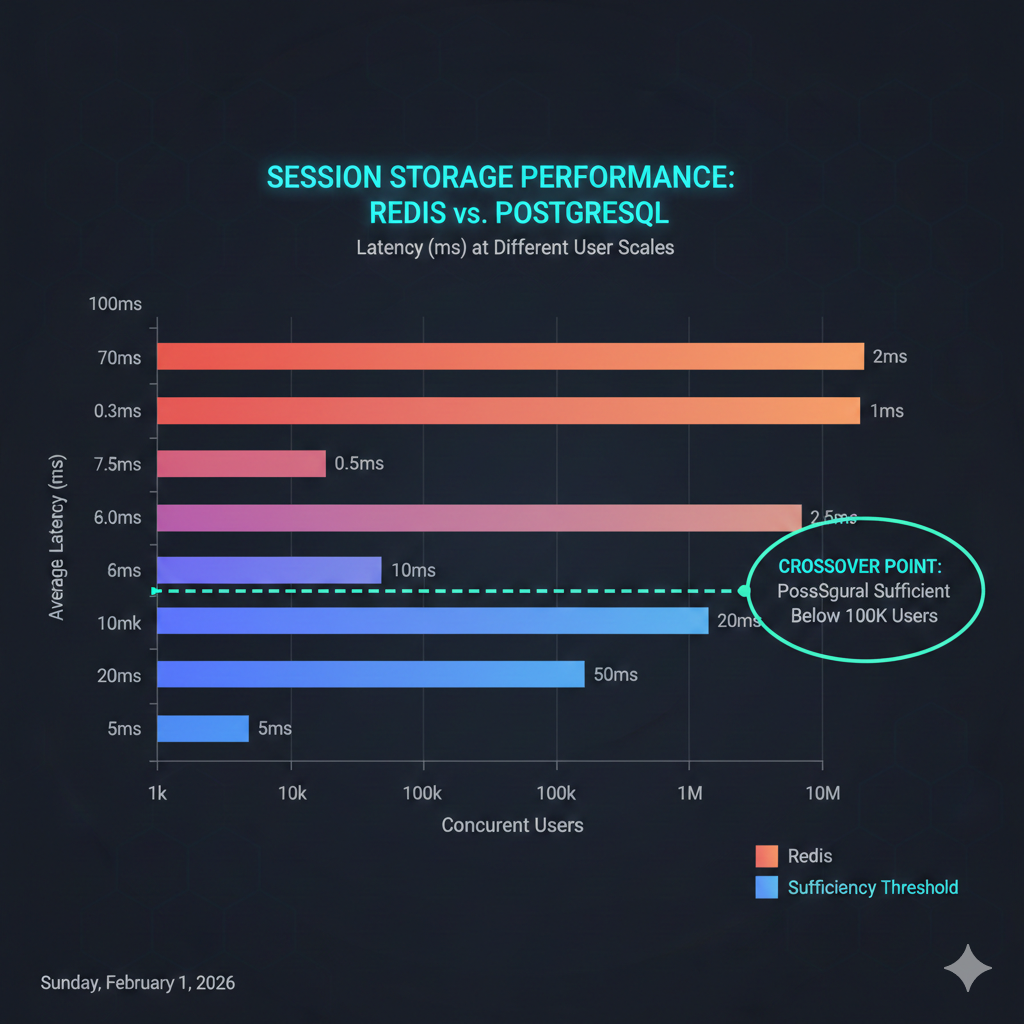
💡 Pro Tip: Run both systems in parallel for a week and measure actual latency differences in your application. The numbers are often closer than you’d expect.
The real win is operational: one less service to monitor, one less failure mode to handle, and one less bill to pay. For a team of 2-5 engineers, eliminating Redis can meaningfully reduce cognitive load.
Designing the PostgreSQL session schema
A well-designed session table needs to support three operations efficiently: lookup by session ID, bulk deletion of expired sessions, and optional lookup by user ID for session management features.
CREATE TABLE sessions (    sid VARCHAR(255) PRIMARY KEY,    sess JSONB NOT NULL,    user_id UUID,    expire TIMESTAMP(6) WITH TIME ZONE NOT NULL,    created_at TIMESTAMP(6) WITH TIME ZONE DEFAULT NOW(),    updated_at TIMESTAMP(6) WITH TIME ZONE DEFAULT NOW());
-- Critical: Index for cleanup jobCREATE INDEX idx_sessions_expire ON sessions (expire);
-- Optional: Index for user session managementCREATE INDEX idx_sessions_user_id ON sessions (user_id)    WHERE user_id IS NOT NULL;
-- Trigger for updated_atCREATE OR REPLACE FUNCTION update_sessions_updated_at()RETURNS TRIGGER AS $$BEGIN    NEW.updated_at = NOW();    RETURN NEW;END;$$ LANGUAGE plpgsql;
CREATE TRIGGER sessions_updated_at    BEFORE UPDATE ON sessions    FOR EACH ROW    EXECUTE FUNCTION update_sessions_updated_at();
The sess column stores session data as JSONB, allowing Express session middleware to serialize and deserialize session objects directly. The user_id column extracts the user identifier for administrative features like “log out all sessions” without parsing JSON on every query.
📝 Note: The
express-sessioncompatible stores expect specific column names. Usingsid,sess, andexpiremaintains compatibility with libraries likeconnect-pg-simple.
For high-traffic applications, consider partitioning by expiration date:
-- Convert to partitioned table (PostgreSQL 12+)CREATE TABLE sessions_partitioned (    sid VARCHAR(255) NOT NULL,    sess JSONB NOT NULL,    user_id UUID,    expire TIMESTAMP(6) WITH TIME ZONE NOT NULL,    created_at TIMESTAMP(6) WITH TIME ZONE DEFAULT NOW(),    updated_at TIMESTAMP(6) WITH TIME ZONE DEFAULT NOW(),    PRIMARY KEY (sid, expire)) PARTITION BY RANGE (expire);
-- Create monthly partitionsCREATE TABLE sessions_2026_01 PARTITION OF sessions_partitioned    FOR VALUES FROM ('2026-01-01') TO ('2026-02-01');
CREATE TABLE sessions_2026_02 PARTITION OF sessions_partitioned    FOR VALUES FROM ('2026-02-01') TO ('2026-03-01');
-- Dropping old partitions is instant (vs DELETE scanning millions of rows)-- DROP TABLE sessions_2026_01;
Partitioning makes cleanup operations instantaneous: dropping a partition is a metadata operation rather than deleting millions of rows.
Setting up Express session middleware
Let’s implement session middleware for both Redis and PostgreSQL. This sets the foundation for our dual-write migration strategy.
import session from 'express-session';import RedisStore from 'connect-redis';import { createClient } from 'redis';
const redisClient = createClient({  url: process.env.REDIS_URL,  socket: {    reconnectStrategy: (retries) => Math.min(retries * 100, 3000)  }});
redisClient.on('error', (err) => console.error('Redis error:', err));await redisClient.connect();
export const redisSessionMiddleware = session({ store: new RedisStore({ client: redisClient, prefix: 'sess:', ttl: 86400 // 24 hours in seconds }), secret: process.env.SESSION_SECRET!, resave: false, saveUninitialized: false, cookie: { secure: process.env.NODE_ENV === 'production', httpOnly: true, maxAge: 24 * 60 * 60 * 1000 // 24 hours in milliseconds }});import session from 'express-session';import pgSession from 'connect-pg-simple';import { Pool } from 'pg';
const PgStore = pgSession(session);
const pool = new Pool({ connectionString: process.env.DATABASE_URL, max: 20, idleTimeoutMillis: 30000, connectionTimeoutMillis: 2000});
export const postgresSessionMiddleware = session({ store: new PgStore({ pool, tableName: 'sessions', createTableIfMissing: false, // We manage schema via migrations pruneSessionInterval: false // We handle cleanup separately }), secret: process.env.SESSION_SECRET!, resave: false, saveUninitialized: false, cookie: { secure: process.env.NODE_ENV === 'production', httpOnly: true, maxAge: 24 * 60 * 60 * 1000 }});Both configurations disable automatic session pruning. We’ll implement cleanup separately with more control over timing and batch sizes.
The dual-write migration strategy
The safest migration path writes to both stores during a transition period. This approach lets you validate PostgreSQL behavior under production load while maintaining Redis as the source of truth.
import { Store, SessionData } from 'express-session';import { createClient, RedisClientType } from 'redis';import { Pool } from 'pg';
interface DualWriteOptions {  redis: RedisClientType;  postgres: Pool;  primaryStore: 'redis' | 'postgres';  onMismatch?: (sid: string, redis: SessionData | null, pg: SessionData | null) => void;}
export class DualWriteStore extends Store {  private redis: RedisClientType;  private postgres: Pool;  private primary: 'redis' | 'postgres';  private onMismatch?: DualWriteOptions['onMismatch'];
  constructor(options: DualWriteOptions) {    super();    this.redis = options.redis;    this.postgres = options.postgres;    this.primary = options.primaryStore;    this.onMismatch = options.onMismatch;  }
  async get(sid: string, callback: (err: any, session?: SessionData | null) => void) {    try {      // Read from primary store      const session = this.primary === 'redis'        ? await this.getFromRedis(sid)        : await this.getFromPostgres(sid);
      // Async validation (don't block the response)      this.validateConsistency(sid).catch(console.error);
      callback(null, session);    } catch (err) {      callback(err);    }  }
  async set(sid: string, session: SessionData, callback?: (err?: any) => void) {    try {      const ttl = this.getTTL(session);
      // Write to both stores in parallel      await Promise.all([        this.setInRedis(sid, session, ttl),        this.setInPostgres(sid, session, ttl)      ]);
      callback?.();    } catch (err) {      callback?.(err);    }  }
  async destroy(sid: string, callback?: (err?: any) => void) {    try {      await Promise.all([        this.redis.del(`sess:${sid}`),        this.postgres.query('DELETE FROM sessions WHERE sid = $1', [sid])      ]);      callback?.();    } catch (err) {      callback?.(err);    }  }
  private async getFromRedis(sid: string): Promise<SessionData | null> {    const data = await this.redis.get(`sess:${sid}`);    return data ? JSON.parse(data) : null;  }
  private async getFromPostgres(sid: string): Promise<SessionData | null> {    const result = await this.postgres.query(      'SELECT sess FROM sessions WHERE sid = $1 AND expire > NOW()',      [sid]    );    return result.rows[0]?.sess || null;  }
  private async setInRedis(sid: string, session: SessionData, ttl: number) {    await this.redis.setEx(`sess:${sid}`, ttl, JSON.stringify(session));  }
  private async setInPostgres(sid: string, session: SessionData, ttl: number) {    const expire = new Date(Date.now() + ttl * 1000);    const userId = (session as any).userId || null;
    await this.postgres.query(`      INSERT INTO sessions (sid, sess, user_id, expire)      VALUES ($1, $2, $3, $4)      ON CONFLICT (sid) DO UPDATE SET        sess = EXCLUDED.sess,        user_id = EXCLUDED.user_id,        expire = EXCLUDED.expire    `, [sid, session, userId, expire]);  }
  private async validateConsistency(sid: string) {    if (!this.onMismatch) return;
    const [redisSession, pgSession] = await Promise.all([      this.getFromRedis(sid),      this.getFromPostgres(sid)    ]);
    const redisJson = JSON.stringify(redisSession);    const pgJson = JSON.stringify(pgSession);
    if (redisJson !== pgJson) {      this.onMismatch(sid, redisSession, pgSession);    }  }
  private getTTL(session: SessionData): number {    const maxAge = session.cookie?.maxAge;    return maxAge ? Math.ceil(maxAge / 1000) : 86400;  }}
This dual-write store provides several safety mechanisms:
- Parallel writes ensure both stores stay synchronized
- Configurable primary lets you switch reads without code changes
- Consistency validation runs asynchronously to detect drift
- Mismatch callback enables alerting when stores diverge
⚠️ Warning: During dual-write, a write failure to the secondary store should be logged but not fail the request. Users shouldn’t experience errors because the backup store is unavailable.
Migration execution plan
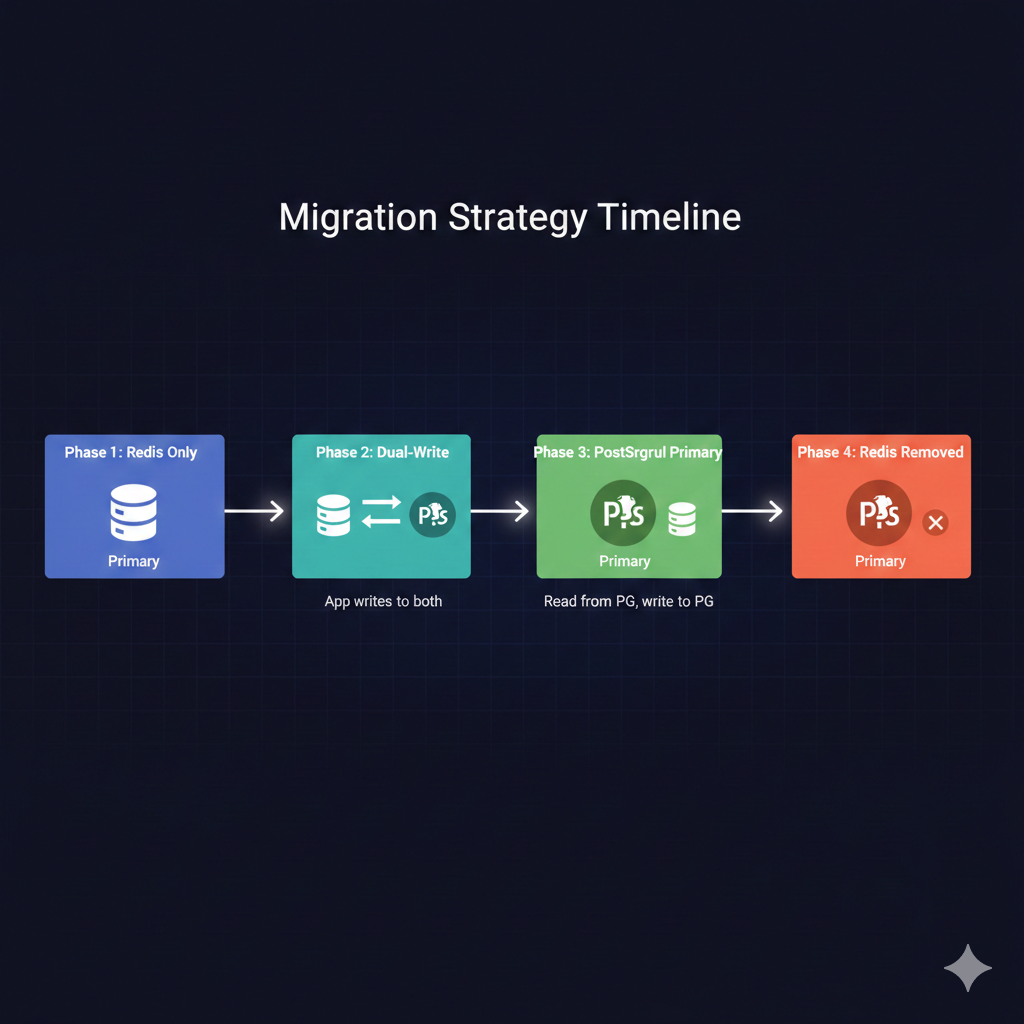
The migration follows four phases, each lasting one to two weeks depending on your traffic patterns:
Phase 1: Redis Primary (Current State)  └── All reads and writes go to Redis  └── PostgreSQL schema deployed but unused
Phase 2: Dual-Write, Redis Primary  └── Writes go to both Redis and PostgreSQL  └── Reads come from Redis  └── Monitor PostgreSQL write latency and errors
Phase 3: Dual-Write, PostgreSQL Primary  └── Writes go to both stores  └── Reads come from PostgreSQL  └── Redis serves as hot backup  └── Compare read latencies between stores
Phase 4: PostgreSQL Only └── Remove Redis writes └── Decommission Redis instance └── Keep Redis configuration for easy rollbackimport { DualWriteStore } from './dual-write-store';import { redisClient } from './redis-store';import { pool } from './postgres-store';import { metrics } from '../monitoring';
type MigrationPhase = 'redis-only' | 'dual-redis-primary' | 'dual-pg-primary' | 'pg-only';
const PHASE: MigrationPhase = process.env.SESSION_MIGRATION_PHASE as MigrationPhase || 'redis-only';
export function getSessionStore() { switch (PHASE) { case 'redis-only': return new RedisStore({ client: redisClient, prefix: 'sess:' });
case 'dual-redis-primary': case 'dual-pg-primary': return new DualWriteStore({ redis: redisClient, postgres: pool, primaryStore: PHASE === 'dual-redis-primary' ? 'redis' : 'postgres', onMismatch: (sid, redis, pg) => { metrics.increment('session.store.mismatch'); console.warn(`Session mismatch for ${sid}`, { redisExists: !!redis, pgExists: !!pg }); } });
case 'pg-only': return new PgStore({ pool, tableName: 'sessions' }); }}Control the migration phase through environment variables. This allows different environments to run different phases and enables instant rollback by changing a single configuration value.
Session cleanup strategies
Unlike Redis, which handles TTL expiration automatically, PostgreSQL requires explicit cleanup. A well-designed cleanup job balances thoroughness with database load.
import { Pool } from 'pg';import { CronJob } from 'cron';
interface CleanupOptions {  pool: Pool;  batchSize: number;  maxDurationMs: number;  onBatchComplete?: (deleted: number) => void;}
export async function cleanupExpiredSessions(options: CleanupOptions): Promise<number> {  const { pool, batchSize, maxDurationMs, onBatchComplete } = options;  const startTime = Date.now();  let totalDeleted = 0;
  while (Date.now() - startTime < maxDurationMs) {    // Delete in batches to avoid long-running transactions    const result = await pool.query(`      DELETE FROM sessions      WHERE sid IN (        SELECT sid FROM sessions        WHERE expire < NOW()        LIMIT $1        FOR UPDATE SKIP LOCKED      )      RETURNING sid    `, [batchSize]);
    const deletedCount = result.rowCount || 0;    totalDeleted += deletedCount;
    onBatchComplete?.(deletedCount);
    // Exit if we deleted fewer than batch size (no more expired sessions)    if (deletedCount < batchSize) {      break;    }
    // Small delay to prevent overwhelming the database    await new Promise(resolve => setTimeout(resolve, 100));  }
  return totalDeleted;}
// Run cleanup every 15 minutesexport const cleanupJob = new CronJob('*/15 * * * *', async () => {  const pool = new Pool({ connectionString: process.env.DATABASE_URL });
  try {    const deleted = await cleanupExpiredSessions({      pool,      batchSize: 1000,      maxDurationMs: 60000, // Max 1 minute per run      onBatchComplete: (count) => {        console.log(`Deleted ${count} expired sessions`);      }    });
    console.log(`Session cleanup complete: ${deleted} total sessions removed`);  } catch (err) {    console.error('Session cleanup failed:', err);  } finally {    await pool.end();  }});
The cleanup job uses several techniques to minimize database impact:
- Batch deletion prevents long-running transactions that lock the table
- SKIP LOCKED allows concurrent session operations during cleanup
- Time limit ensures the job doesn’t run indefinitely during peak hours
- Delay between batches gives other queries breathing room
💡 Pro Tip: If using partitioned tables, replace the cleanup job with a scheduled partition drop. It’s significantly faster for high-volume applications.
For partitioned tables, add a job that creates future partitions and drops old ones:
export async function maintainPartitions(pool: Pool) {  const now = new Date();
  // Create partition for next month  const nextMonth = new Date(now.getFullYear(), now.getMonth() + 2, 1);  const monthAfter = new Date(now.getFullYear(), now.getMonth() + 3, 1);  const partitionName = `sessions_${nextMonth.getFullYear()}_${String(nextMonth.getMonth() + 1).padStart(2, '0')}`;
  await pool.query(`    CREATE TABLE IF NOT EXISTS ${partitionName}    PARTITION OF sessions_partitioned    FOR VALUES FROM ('${nextMonth.toISOString().split('T')[0]}')    TO ('${monthAfter.toISOString().split('T')[0]}')  `);
  // Drop partition from 3 months ago  const oldMonth = new Date(now.getFullYear(), now.getMonth() - 2, 1);  const oldPartitionName = `sessions_${oldMonth.getFullYear()}_${String(oldMonth.getMonth() + 1).padStart(2, '0')}`;
  await pool.query(`DROP TABLE IF EXISTS ${oldPartitionName}`);}
Performance monitoring and validation
Before completing the migration, validate that PostgreSQL meets your latency requirements under production load.
import { Pool } from 'pg';import { Histogram } from 'prom-client';
const sessionLatency = new Histogram({  name: 'session_operation_duration_seconds',  help: 'Session operation latency',  labelNames: ['operation', 'store'],  buckets: [0.001, 0.005, 0.01, 0.025, 0.05, 0.1, 0.25, 0.5, 1]});
export function instrumentedQuery(pool: Pool, store: string) {  return async (operation: string, query: string, params: any[]) => {    const end = sessionLatency.startTimer({ operation, store });    try {      return await pool.query(query, params);    } finally {      end();    }  };}
Key metrics to track during migration:
- p50, p95, p99 latency for session reads and writes
- Error rate for each store
- Mismatch count between Redis and PostgreSQL
- Active sessions in each store (should converge)
- Cleanup job duration and rows deleted
A successful migration shows PostgreSQL latencies within acceptable bounds (typically under 10ms for p99) and zero mismatches after the initial sync period.
Key takeaways
Migrating session storage from Redis to PostgreSQL reduces infrastructure complexity for applications that don’t require Redis’s extreme performance characteristics. Here’s what makes the migration successful:
- Measure first: Run both stores in parallel and compare actual latencies before committing to migration
- Design for cleanup: PostgreSQL doesn’t auto-expire rows, so build robust cleanup jobs from day one
- Use dual-write: The transition period catches bugs and performance issues before they affect users
- Index strategically: The expire column index is critical for cleanup performance
- Consider partitioning: For high-volume applications, partitioned tables make cleanup instantaneous
The migration isn’t right for every application. If you’re already at scale with Redis, the operational overhead is justified. But for teams looking to simplify their stack, PostgreSQL handles session storage remarkably well.
Start with the dual-write phase in a staging environment, validate your latency numbers, and proceed with confidence. The worst case scenario is rolling back to Redis, which takes exactly one environment variable change.