Building Knowledge Graphs with Neo4j for Project Documentation
Documentation has a half-life problem. The moment you write it, entropy begins. APIs change, services get renamed, dependencies evolve, and that carefully crafted architecture diagram becomes a historical artifact rather than a living reference. In complex systems with dozens of microservices, multiple repositories, and intricate dependency chains, traditional documentation approaches simply cannot keep pace.
Knowledge graphs offer a fundamentally different approach. Instead of static documents describing your system, you build a queryable model of the system itself - one that can be updated programmatically, queried dynamically, and visualized interactively. Neo4j, the leading graph database, provides the perfect foundation for this approach.
This article demonstrates how to build a knowledge graph for project documentation, covering data modeling, Cypher queries for discovery, Python integration for automation, and MCP integration for AI-assisted querying.
Why knowledge graphs beat relational databases for documentation
Before diving into implementation, it’s worth understanding why graph databases excel at documentation use cases where relational databases struggle.
The relationship problem
Consider documenting service dependencies in a relational database. You’d need:
| Table | Purpose |
|---|---|
services | Service definitions |
repositories | Repository metadata |
apis | API endpoint definitions |
service_dependencies | Junction table for service-to-service deps |
service_repositories | Junction table for service-to-repo mapping |
api_service | Junction table for API-to-service mapping |
Querying “what services are affected if API X goes down” requires multiple JOINs across junction tables. As relationships multiply, queries become unwieldy and performance degrades.
The graph advantage
In a graph database, relationships are first-class citizens:
(PaymentService)-[:CALLS]->(StripeAPI)(PaymentService)-[:DEPENDS_ON]->(AuthService)(PaymentService)-[:LIVES_IN]->(payments-repo)The query “what services are affected if API X goes down” becomes a simple traversal:
MATCH (api:API {name: "StripeAPI"})<-[:CALLS]-(service:Service)RETURN service.nameGraph databases also excel at variable-depth queries. “Show me all transitive dependencies of ServiceA” is a one-liner in Cypher but requires recursive CTEs or application-level logic in SQL.
Designing the data model
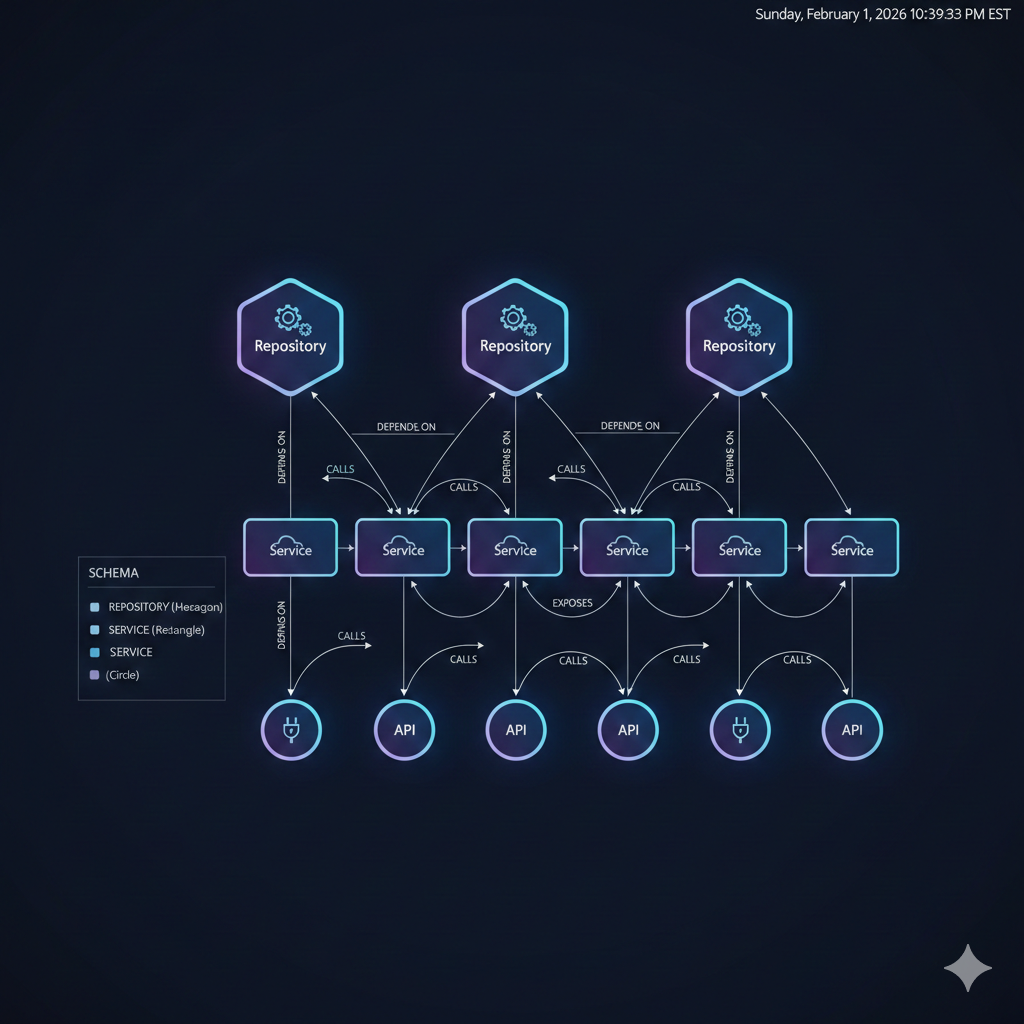
A practical documentation knowledge graph needs nodes for the core entities in your system and relationships that capture how they interact.
Node types
// Repositories - where code livesCREATE (r:Repository {    name: "payments-service",    url: "github.com/org/payments-service",    language: "Python",    team: "Platform"})
// Services - deployable unitsCREATE (s:Service {    name: "PaymentProcessor",    type: "microservice",    port: 8080,    healthcheck: "/health"})
// APIs - interfaces exposed by servicesCREATE (a:API {    name: "PaymentAPI",    version: "v2",    protocol: "REST",    base_path: "/api/v2/payments"})
// Dependencies - external systemsCREATE (d:Dependency {    name: "PostgreSQL",    type: "database",    version: "15.2"})
Relationship types
The power of the graph emerges from relationships:
// Service lives in a repository(service:Service)-[:LIVES_IN]->(repo:Repository)
// Service exposes an API(service:Service)-[:EXPOSES]->(api:API)
// Service calls another service's API(caller:Service)-[:CALLS {frequency: "high"}]->(api:API)
// Service depends on another service(dependent:Service)-[:DEPENDS_ON {critical: true}]->(dependency:Service)
// Service uses a dependency(service:Service)-[:USES {purpose: "primary_datastore"}]->(dep:Dependency)
// Repository contains another repository (monorepo)(parent:Repository)-[:CONTAINS]->(child:Repository)
The relationship properties (frequency, critical, purpose) add semantic richness that enables nuanced queries.
Schema visualization
┌─────────────────┐│ Repository ││ name, url, team │└────────┬────────┘ │ LIVES_IN ▼┌─────────────────┐ EXPOSES ┌─────────────┐│ Service │──────────────────▶│ API ││ name, type,port │ │ name,version│└────────┬────────┘ └──────▲──────┘ │ │ │ DEPENDS_ON CALLS │ ▼ │┌─────────────────┐ ┌──────┴──────┐│ Service │ │ Service ││ (another) │ │ (caller) │└────────┬────────┘ └─────────────┘ │ USES ▼┌─────────────────┐│ Dependency ││ PostgreSQL, etc │└─────────────────┘Building the graph with Python
Manual graph construction doesn’t scale. Here’s how to automate knowledge graph population using Python and the official Neo4j driver.
Connection setup
from neo4j import GraphDatabasefrom contextlib import contextmanagerfrom typing import Any
class KnowledgeGraphClient:    """Client for documentation knowledge graph operations."""
    def __init__(self, uri: str, user: str, password: str):        self._driver = GraphDatabase.driver(uri, auth=(user, password))
    def close(self):        self._driver.close()
    @contextmanager    def session(self):        session = self._driver.session()        try:            yield session        finally:            session.close()
    def run_query(self, query: str, **params: Any) -> list[dict]:        """Execute a Cypher query and return results as dicts."""        with self.session() as session:            result = session.run(query, **params)            return [record.data() for record in result]
Populating from repository metadata
import subprocessimport jsonfrom pathlib import Path
def scan_repository(repo_path: Path) -> dict:    """Extract metadata from a repository."""    metadata = {        "name": repo_path.name,        "path": str(repo_path),        "language": detect_language(repo_path),        "dependencies": [],    }
    # Parse pyproject.toml for Python projects    pyproject = repo_path / "pyproject.toml"    if pyproject.exists():        import tomllib        with open(pyproject, "rb") as f:            data = tomllib.load(f)            deps = data.get("project", {}).get("dependencies", [])            metadata["dependencies"] = [parse_dep_name(d) for d in deps]
    # Parse package.json for Node projects    package_json = repo_path / "package.json"    if package_json.exists():        with open(package_json) as f:            data = json.load(f)            deps = list(data.get("dependencies", {}).keys())            metadata["dependencies"] = deps
    return metadata
def populate_repository(client: KnowledgeGraphClient, metadata: dict):    """Create or update a repository node."""    query = """    MERGE (r:Repository {name: $name})    SET r.path = $path,        r.language = $language,        r.updated_at = datetime()    RETURN r    """    client.run_query(query, **metadata)
    # Create dependency relationships    for dep in metadata.get("dependencies", []):        dep_query = """        MERGE (d:Dependency {name: $dep_name})        WITH d        MATCH (r:Repository {name: $repo_name})        MERGE (r)-[:USES]->(d)        """        client.run_query(dep_query, dep_name=dep, repo_name=metadata["name"])
Service discovery from Docker Compose
Many projects define services in docker-compose.yml. Here’s how to extract that structure:
import yamlfrom pathlib import Path
def parse_docker_compose(compose_file: Path) -> list[dict]:    """Extract service definitions from docker-compose.yml."""    with open(compose_file) as f:        compose = yaml.safe_load(f)
    services = []    for name, config in compose.get("services", {}).items():        service = {            "name": name,            "image": config.get("image", ""),            "ports": config.get("ports", []),            "depends_on": config.get("depends_on", []),            "environment": list(config.get("environment", {}).keys()),        }        services.append(service)
    return services
def populate_services(client: KnowledgeGraphClient, services: list[dict], repo_name: str):    """Create service nodes and relationships."""    for svc in services:        # Create service node        query = """        MERGE (s:Service {name: $name})        SET s.image = $image,            s.ports = $ports,            s.updated_at = datetime()        WITH s        MATCH (r:Repository {name: $repo_name})        MERGE (s)-[:LIVES_IN]->(r)        """        client.run_query(query, repo_name=repo_name, **svc)
        # Create DEPENDS_ON relationships        for dep in svc.get("depends_on", []):            dep_query = """            MATCH (s:Service {name: $name})            MERGE (d:Service {name: $dep_name})            MERGE (s)-[:DEPENDS_ON]->(d)            """            client.run_query(dep_query, name=svc["name"], dep_name=dep)
Pro Tip: Run this population script in CI/CD pipelines to keep your knowledge graph synchronized with actual infrastructure.
Cypher queries for documentation discovery
With the graph populated, Cypher queries become your documentation interface. Here are patterns for common discovery scenarios.
Impact analysis
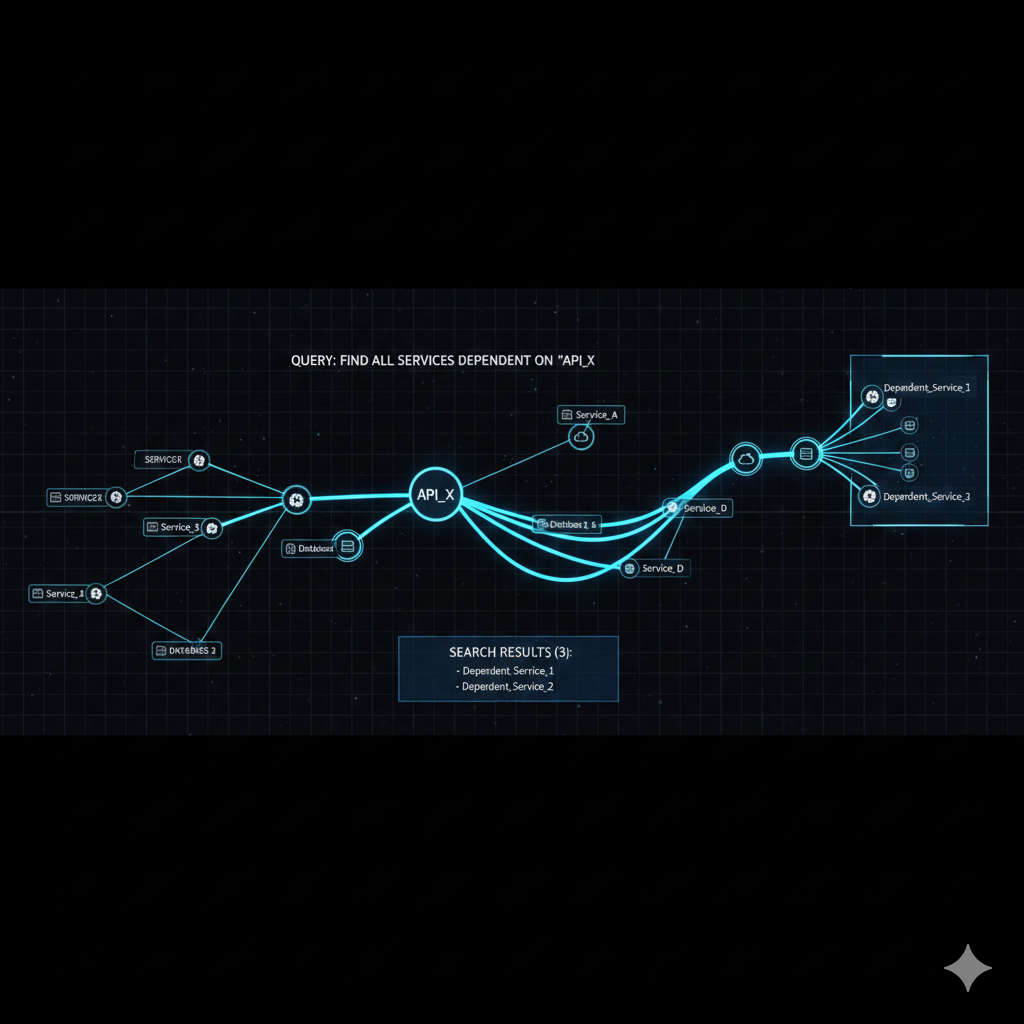
What services are affected if a dependency fails?
// Find all services affected by PostgreSQL outageMATCH (d:Dependency {name: "PostgreSQL"})<-[:USES*1..3]-(affected)RETURN DISTINCT affected.name AS affected_service, length(shortestPath((d)<-[:USES*]-(affected))) AS distanceORDER BY distanceThe *1..3 syntax enables variable-depth traversal, capturing both direct and transitive dependencies.
Dependency graph for a service
// Get complete dependency tree for a serviceMATCH path = (s:Service {name: "PaymentProcessor"})-[:DEPENDS_ON|CALLS*1..5]->(dep)RETURN pathThis query returns paths that can be visualized directly in Neo4j Browser.
Finding orphaned components
// Services with no incoming dependencies (potential entry points or orphans)MATCH (s:Service)WHERE NOT EXISTS { ()-[:DEPENDS_ON|CALLS]->(s) }RETURN s.name AS orphaned_service, s.type AS typeAPI consumers
// Who calls this API and how often?MATCH (caller:Service)-[r:CALLS]->(api:API {name: "PaymentAPI"})RETURN caller.name AS consumer, r.frequency AS call_frequency, caller.team AS teamORDER BY r.frequency DESCCross-team dependencies
// Find dependencies between teamsMATCH (s1:Service)-[:DEPENDS_ON]->(s2:Service)WHERE s1.team <> s2.teamRETURN s1.team AS from_team, s2.team AS to_team, count(*) AS dependency_countORDER BY dependency_count DESCIntegration with MCP for AI-assisted querying
The Model Context Protocol (MCP) enables AI assistants like Claude to query your knowledge graph directly. This transforms documentation from something you read to something you converse with.
MCP server configuration
Configure the Neo4j Cypher MCP server in your Claude Code settings:
{ "mcpServers": { "neo4j-cypher": { "command": "uvx", "args": [ "mcp-neo4j-cypher", "--db-url", "bolt://localhost:7687", "--username", "neo4j", "--password", "your-password" ] } }}AI-powered documentation queries
With MCP configured, you can ask natural language questions about your system:
User: "What happens if the auth service goes down?"
Claude: Let me query the knowledge graph to analyze the impact.
[Executes Cypher query via MCP]
Based on the dependency graph, 7 services depend on AuthService:- PaymentProcessor (critical dependency)- UserProfileService (critical dependency)- NotificationService (non-critical)- ReportingService (non-critical)- AdminDashboard (critical)- APIGateway (critical)- WebhookProcessor (non-critical)
4 of these have critical dependencies, meaning they will fail immediately.The remaining 3 have graceful degradation paths.
Memory server for context
Combine with the Neo4j Memory MCP server to store architectural decisions alongside the structural graph:
{ "mcpServers": { "neo4j-memory": { "command": "npx", "args": ["-y", "@sylweriusz/mcp-neo4j-memory-server"], "env": { "NEO4J_URI": "bolt://localhost:7687", "NEO4J_USER": "neo4j", "NEO4J_PASSWORD": "your-password" } } }}Now Claude can both query the system structure and recall past design decisions:
User: "Why does PaymentProcessor depend on AuthService?"
Claude: [Queries neo4j-memory]
According to the design decision from January 2024:"PaymentProcessor validates JWT tokens against AuthService forPCI compliance. Direct token validation was rejected due tokey rotation complexity."
Visualization with Neo4j Browser
Neo4j Browser provides interactive visualization of your documentation graph. Access it at http://localhost:7474 (or your configured port).
Useful visualization queries
// Show all services and their connectionsMATCH (s:Service)-[r]->(target)WHERE type(r) IN ['DEPENDS_ON', 'CALLS', 'EXPOSES']RETURN s, r, targetStyling nodes by type
Neo4j Browser supports Graph Style Sheet (GraSS) for visual customization:
node.Service {  color: #4C8BF5;  border-color: #2E5CB8;  caption: '{name}';}
node.API {  color: #34A853;  border-color: #1E7E34;  caption: '{name} {version}';}
node.Dependency {  color: #EA4335;  border-color: #B31412;  caption: '{name}';}
relationship.DEPENDS_ON {  color: #FF6B6B;  shaft-width: 2px;}
relationship.CALLS {  color: #4ECDC4;  shaft-width: 1px;}
Keeping documentation alive
The knowledge graph approach transforms documentation from a static artifact into living infrastructure. Here are patterns for maintaining accuracy:
- CI/CD integration: Run population scripts on every merge to main
- Drift detection: Compare graph state against actual infrastructure weekly
- Annotation workflows: Let developers add context via PR comments that flow into the graph
- Alerting: Trigger notifications when critical dependency paths change
def detect_drift(client: KnowledgeGraphClient, actual_services: set[str]) -> dict:    """Compare graph state against actual running services."""    query = "MATCH (s:Service) RETURN s.name AS name"    graph_services = {r["name"] for r in client.run_query(query)}
    return {        "missing_from_graph": actual_services - graph_services,        "stale_in_graph": graph_services - actual_services,    }
Key takeaways
Building documentation as a knowledge graph rather than static documents provides capabilities that traditional approaches cannot match:
- Queryable documentation: Ask questions, don’t search documents
- Impact analysis: Understand change blast radius before deploying
- Living accuracy: Automated population keeps documentation current
- AI integration: MCP enables conversational documentation queries
- Visual exploration: Neo4j Browser makes architecture tangible
The initial investment in modeling your system as a graph pays dividends every time someone asks “what depends on this?” or “what happens if that fails?” - questions that would otherwise require tribal knowledge or archaeological expeditions through wikis.
For complex systems, knowledge graphs transform documentation from a maintenance burden into a queryable asset that grows more valuable over time.