
Using Neo4j for Design Decision Memory in CAD Projects
Every experienced engineer knows the frustration: you return to a CAD project after a few weeks away, and cannot remember why you chose M3 screws instead of M4, why the motor mount angle is 5 degrees, or which components have clearance dependencies. Design decisions made with careful reasoning evaporate between sessions, leaving you to rediscover constraints through trial and error.
Traditional CAD systems excel at storing geometry but fail at preserving context. Comments in code help, but they are linear and disconnected. What if your CAD system could remember not just the parts, but the relationships and reasoning behind every design choice?
This article demonstrates how to build a design memory system using Neo4j, a graph database perfectly suited for capturing the interconnected nature of engineering decisions. The examples come from a parametric CAD system built with CadQuery, but the patterns apply to any design workflow where preserving context across sessions matters.
Why graph databases for design memory
Relational databases store data in tables with fixed schemas. Design decisions do not fit this model well. A single decision might connect a motor to a frame, reference a weight constraint, depend on three prior choices, and affect future component selections. These relationships form a graph, not a table.
Neo4j stores data as nodes (things) connected by relationships (how things relate). This maps naturally to CAD concepts:
| CAD Concept | Graph Element |
|---|---|
| Component (motor, screw, frame) | Node with properties |
| ”Motor mounts on frame” | Relationship |
| ”Chose M3 for weight savings” | Decision node linked to components |
| ”Propeller needs 2mm clearance from arm” | Constraint relationship |
| Assembly hierarchy | Parent-child relationships |
The power of graph databases emerges when querying. Finding “all decisions that affect the motor mount” requires traversing relationships, something graphs do in constant time regardless of dataset size.
Data model for design memory
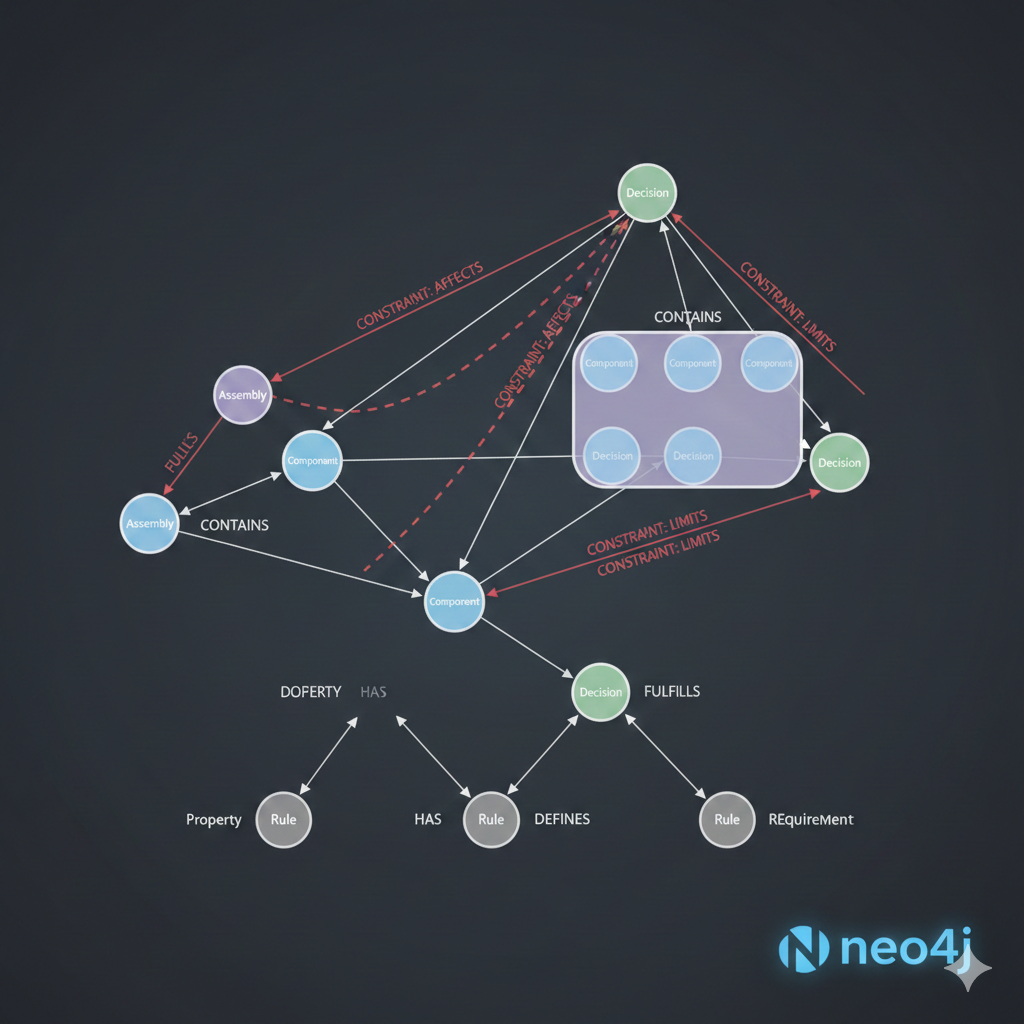
A practical design memory system needs four core node types:
Component - Physical parts in the design. Each component node stores the name, source (custom, cq_warehouse, PartCAD), category, and key parameters.
Decision - Design choices with their rationale. Decisions capture the why behind the design, not just the what.
Constraint - Quantitative requirements like clearances, weight limits, or dimensional bounds.
Assembly - Hierarchical groupings of components that form sub-systems.
The relationships between these nodes capture the design knowledge:
┌─────────────┐ │ Assembly │ │ "Propulsion"│ └──────┬──────┘ │ CONTAINS ┌────────────┼────────────┐ ▼ ▼ ▼ ┌──────────┐ ┌──────────┐ ┌──────────┐ │Component │ │Component │ │Component │ │"motor_ │ │"prop_5 │ │"esc_ │ │ 2207" │ │ inch" │ │ 35A" │ └────┬─────┘ └────┬─────┘ └────┬─────┘ │ │ │ │ AFFECTED_BY│ DEPENDS_ON │ CONNECTS_TO ▼ ▼ │ ┌──────────┐ ┌──────────┐ │ │ Decision │ │Constraint│◀─────┘ │"2207 for │ │"2mm prop │ │ 5-inch" │ │clearance"│ └──────────┘ └──────────┘This structure allows queries like “What decisions affect the propulsion assembly?” or “Which constraints does the motor selection satisfy?”
Setting up Neo4j for design memory
Neo4j runs locally via Docker, making it easy to include in a development environment. The following configuration uses a custom port to avoid conflicts with other services:
services:  neo4j-cad:    image: neo4j:5.15-community    container_name: neo4j-cad-memory    ports:      - "7475:7474"  # HTTP browser      - "7688:7687"  # Bolt protocol    environment:      NEO4J_AUTH: neo4j/semicad2026      NEO4J_PLUGINS: '["apoc"]'    volumes:      - neo4j_data:/data      - neo4j_logs:/logs
volumes:  neo4j_data:  neo4j_logs:
Start the container and access the browser at http://localhost:7475. The Bolt protocol on port 7688 is what Python code uses to connect.
Python integration with neo4j driver
The official neo4j Python driver provides a clean interface for graph operations. Here is a DesignMemory class that encapsulates common operations:
from dataclasses import dataclassfrom datetime import datetimefrom typing import Any
from neo4j import GraphDatabase

@dataclassclass DesignDecision:    """Represents a design decision with its context."""    id: str    description: str    rationale: str    timestamp: datetime    tags: list[str]    related_components: list[str]

class DesignMemory:    """Interface for storing and querying design decisions in Neo4j."""
    def __init__(self, uri: str, user: str, password: str):        self._driver = GraphDatabase.driver(uri, auth=(user, password))
    def close(self) -> None:        self._driver.close()
    def __enter__(self) -> "DesignMemory":        return self
    def __exit__(self, *args: Any) -> None:        self.close()
    def add_component(        self,        name: str,        source: str,        category: str,        params: dict[str, Any] | None = None,    ) -> str:        """Add a component node to the graph."""        query = """        MERGE (c:Component {name: $name})        SET c.source = $source,            c.category = $category,            c.params = $params,            c.updated_at = datetime()        RETURN elementId(c) as id        """        with self._driver.session() as session:            result = session.run(                query,                name=name,                source=source,                category=category,                params=params or {},            )            return result.single()["id"]
    def add_decision(        self,        description: str,        rationale: str,        tags: list[str] | None = None,        component_names: list[str] | None = None,    ) -> str:        """Record a design decision and link it to components."""        query = """        CREATE (d:Decision {            description: $description,            rationale: $rationale,            tags: $tags,            created_at: datetime()        })        WITH d        UNWIND $components AS comp_name        MATCH (c:Component {name: comp_name})        CREATE (c)-[:AFFECTED_BY]->(d)        RETURN elementId(d) as id        """        with self._driver.session() as session:            result = session.run(                query,                description=description,                rationale=rationale,                tags=tags or [],                components=component_names or [],            )            return result.single()["id"]
    def add_constraint(        self,        name: str,        constraint_type: str,        value: float,        unit: str,        component_names: list[str] | None = None,    ) -> str:        """Add a constraint and link to affected components."""        query = """        CREATE (con:Constraint {            name: $name,            type: $constraint_type,            value: $value,            unit: $unit,            created_at: datetime()        })        WITH con        UNWIND $components AS comp_name        MATCH (c:Component {name: comp_name})        CREATE (c)-[:CONSTRAINED_BY]->(con)        RETURN elementId(con) as id        """        with self._driver.session() as session:            result = session.run(                query,                name=name,                constraint_type=constraint_type,                value=value,                unit=unit,                components=component_names or [],            )            return result.single()["id"]
The class uses MERGE for components (create if not exists, update if exists) and CREATE for decisions and constraints (each should be unique). Context managers ensure connections close properly.
Cypher queries for common operations
Cypher, Neo4j’s query language, reads almost like English for graph traversals. Here are queries for typical design memory operations.
Find all decisions affecting a component:
MATCH (c:Component {name: "motor_2207"})-[:AFFECTED_BY]->(d:Decision)RETURN d.description, d.rationale, d.created_atORDER BY d.created_at DESCFind components sharing a constraint:
MATCH (c1:Component)-[:CONSTRAINED_BY]->(con:Constraint)<-[:CONSTRAINED_BY]-(c2:Component)WHERE c1 <> c2RETURN c1.name, c2.name, con.name, con.value, con.unitGet decision history with component context:
MATCH (d:Decision)OPTIONAL MATCH (c:Component)-[:AFFECTED_BY]->(d)WITH d, collect(c.name) as componentsRETURN d.description, d.rationale, components, d.created_atORDER BY d.created_at DESCLIMIT 20Find the “impact path” of a decision:
MATCH path = (d:Decision {description: "Chose 220mm wheelbase"})<-[:AFFECTED_BY]-(c:Component) -[:CONSTRAINED_BY]->(con:Constraint)RETURN pathThis last query demonstrates the power of graph traversals: starting from a decision, find all components it affects, then find all constraints those components must satisfy.
Extending the DesignMemory class
The base class handles creation. Add query methods to retrieve design context:
class DesignMemory:    # ... previous methods ...
    def get_component_decisions(self, component_name: str) -> list[DesignDecision]:        """Get all decisions affecting a component."""        query = """        MATCH (c:Component {name: $name})-[:AFFECTED_BY]->(d:Decision)        OPTIONAL MATCH (other:Component)-[:AFFECTED_BY]->(d)        WHERE other.name <> $name        WITH d, collect(DISTINCT other.name) as other_components        RETURN d.description as description,               d.rationale as rationale,               d.created_at as timestamp,               d.tags as tags,               other_components        ORDER BY d.created_at DESC        """        with self._driver.session() as session:            result = session.run(query, name=component_name)            return [                DesignDecision(                    id=str(i),                    description=record["description"],                    rationale=record["rationale"],                    timestamp=record["timestamp"].to_native(),                    tags=record["tags"] or [],                    related_components=record["other_components"],                )                for i, record in enumerate(result)            ]
    def find_related_components(        self,        component_name: str,        max_depth: int = 2    ) -> list[dict[str, Any]]:        """Find components related through decisions or constraints."""        query = """        MATCH (c:Component {name: $name})        CALL apoc.path.subgraphNodes(c, {            maxLevel: $depth,            relationshipFilter: "AFFECTED_BY|CONSTRAINED_BY|DEPENDS_ON"        }) YIELD node        WHERE node:Component AND node.name <> $name        RETURN DISTINCT node.name as name,               node.category as category,               node.source as source        """        with self._driver.session() as session:            result = session.run(query, name=component_name, depth=max_depth)            return [dict(record) for record in result]
    def search_decisions(self, keyword: str) -> list[DesignDecision]:        """Full-text search across decision descriptions and rationale."""        query = """        MATCH (d:Decision)        WHERE d.description CONTAINS $keyword           OR d.rationale CONTAINS $keyword           OR ANY(tag IN d.tags WHERE tag CONTAINS $keyword)        OPTIONAL MATCH (c:Component)-[:AFFECTED_BY]->(d)        WITH d, collect(c.name) as components        RETURN d.description as description,               d.rationale as rationale,               d.created_at as timestamp,               d.tags as tags,               components        ORDER BY d.created_at DESC        """        with self._driver.session() as session:            result = session.run(query, keyword=keyword)            return [                DesignDecision(                    id=str(i),                    description=record["description"],                    rationale=record["rationale"],                    timestamp=record["timestamp"].to_native(),                    tags=record["tags"] or [],                    related_components=record["components"],                )                for i, record in enumerate(result)            ]
The find_related_components method uses APOC (Awesome Procedures on Cypher), Neo4j’s standard library of extended procedures. It performs a variable-depth traversal to find components connected through any decision or constraint relationship.
Practical usage in a CAD workflow
Here is how design memory integrates into a real parametric CAD workflow using CadQuery:
from semicad import get_registryfrom design_memory import DesignMemory
# Initializeregistry = get_registry()memory = DesignMemory(    uri="bolt://localhost:7688",    user="neo4j",    password="semicad2026")
# Register components as we use themmotor = registry.get("motor_2207")memory.add_component(    name="motor_2207",    source="custom",    category="propulsion",    params={"kv": 2400, "diameter": 27.9, "height": 31.7})
# Record the design decision with rationalememory.add_decision(    description="Selected 2207 motor size for 5-inch build",    rationale="2207 provides optimal thrust-to-weight for 5-inch props. "              "Smaller 2205 lacks headroom; larger 2306 adds unnecessary weight.",    tags=["propulsion", "motor-selection", "5-inch"],    component_names=["motor_2207"])
# Add dimensional constraintmemory.add_constraint(    name="prop_clearance",    constraint_type="minimum_distance",    value=2.0,    unit="mm",    component_names=["motor_2207", "prop_5inch", "frame_arm"])
# Later, when returning to the project...# Query why this motor was chosendecisions = memory.get_component_decisions("motor_2207")for d in decisions:    print(f"Decision: {d.description}")    print(f"Rationale: {d.rationale}")    print(f"Also affects: {d.related_components}")
The key insight is recording decisions at the moment they are made, when the reasoning is fresh. Six months later, the query retrieves not just “we use a 2207 motor” but “why 2207 was chosen over alternatives.”
Cross-session continuity benefits
Design memory transforms how engineers interact with long-running projects:
Onboarding new team members. Instead of tribal knowledge, decisions are queryable. “Why is the motor mount angled?” has a documented answer linked to the specific components involved.
Avoiding repeated mistakes. Constraints persist. If you previously determined that M4 screws are too heavy for this application, that constraint exists in the graph. Queries can warn when a new component selection violates existing constraints.
Traceability for certification. Industries requiring design traceability (aerospace, medical devices) can export the decision graph as an audit trail.
AI-assisted design. Large language models can query the design memory to understand context before suggesting modifications. “Given the existing constraints, what motor alternatives fit?” becomes answerable.
Pro Tip: Integrate design memory with your component registry. When
registry.get()loads a component, automatically check for existing decisions and constraints affecting that component.
Key takeaways
Building a design memory system with Neo4j provides capabilities that traditional CAD documentation lacks:
- Graph structure naturally models the interconnected nature of design decisions, constraints, and components
- Cypher queries make it easy to traverse relationships and find related information without knowing the exact path in advance
- Persistent storage means design rationale survives across sessions, team members, and project phases
- The DesignMemory class demonstrates a practical Python interface that integrates cleanly with existing CAD workflows
- Cross-session continuity transforms isolated design sessions into a connected knowledge base that grows over time
The hardest part of this system is not the technology but the discipline: recording decisions when they are made, not after the fact. The payoff comes when you return to a complex project and can query exactly why every design choice was made.
For parametric CAD projects where context matters as much as geometry, a graph-based design memory is not just a nice-to-have. It is the difference between rediscovering your own work and building on it.