
Secrets Management with Infisical in Production
Introduction
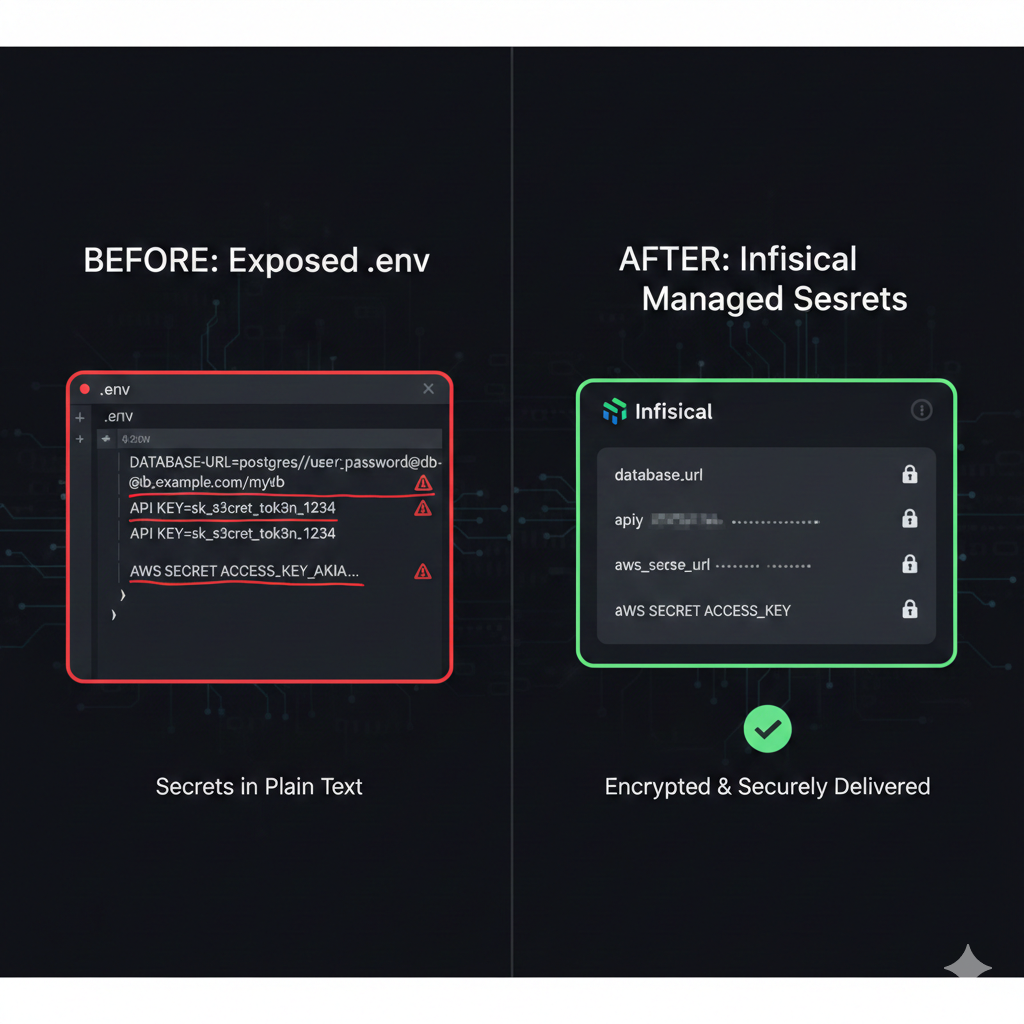
Every developer has done it at least once: committed a .env file to version control, shared API keys over Slack, or copy-pasted database credentials into a deployment script. These shortcuts seem harmless until they become security incidents. The 2023 CircleCI breach exposed thousands of customer secrets stored in environment variables. The Uber hack originated from hardcoded credentials in a PowerShell script. Secrets management isn’t just a best practice - it’s a critical security control.
The challenge is that secrets are everywhere in modern applications. Database connection strings, API keys for third-party services, JWT signing keys, OAuth client secrets, encryption keys - each one is a potential attack vector if mishandled. Traditional approaches like .env files provide no access control, no audit logging, no rotation capabilities, and no way to revoke compromised credentials without redeploying.
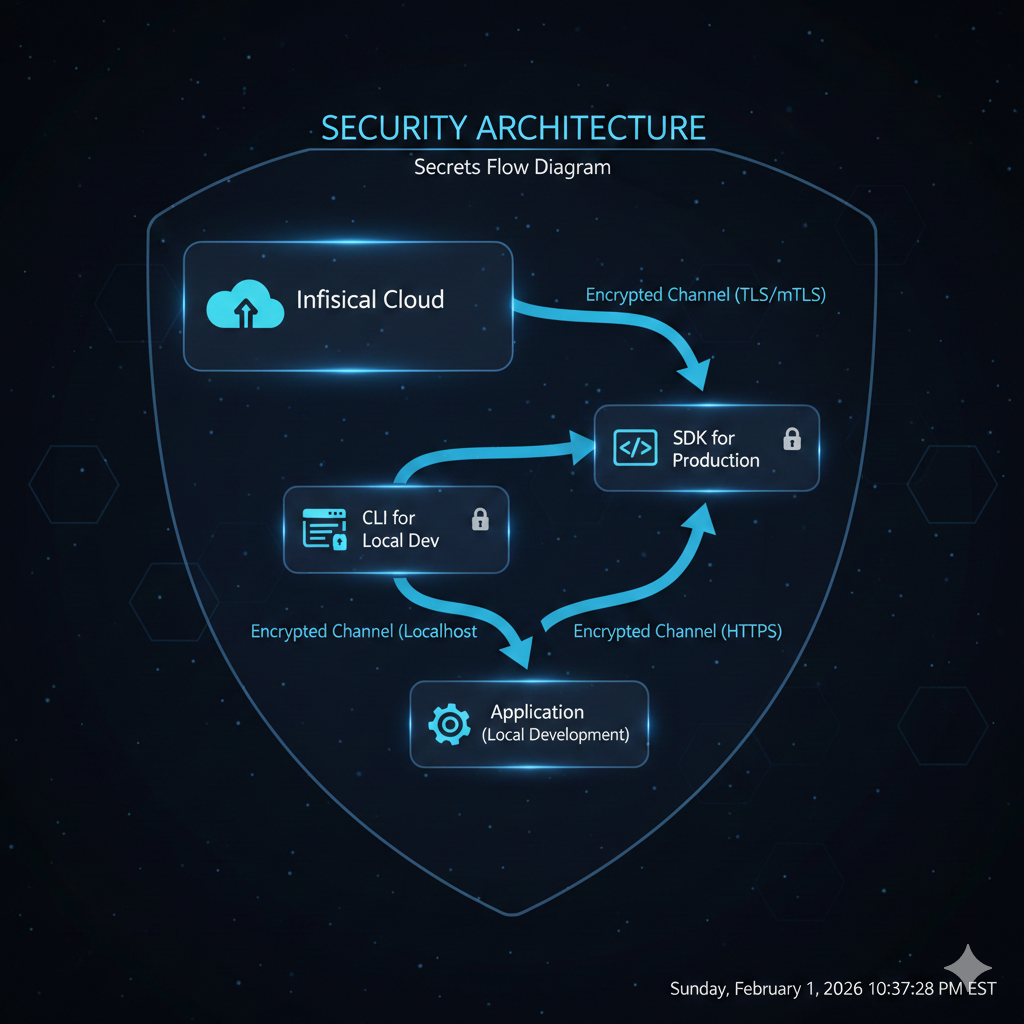
Infisical offers an open-source solution to this problem. It provides centralized secrets management with features previously only available in enterprise tools like HashiCorp Vault or AWS Secrets Manager - but with a developer experience designed for modern workflows. In this article, we’ll explore how to integrate Infisical into your development and production environments, from CLI setup to Node.js SDK integration.
Why Infisical over alternatives
Before diving into implementation, let’s understand where Infisical fits in the secrets management landscape.
| Feature | .env files | AWS Secrets Manager | HashiCorp Vault | Infisical |
|---|---|---|---|---|
| Self-hosted option | N/A | No | Yes | Yes |
| Cloud option | No | Yes | Yes (HCP) | Yes |
| CLI for local dev | No | Limited | Yes | Yes |
| Native SDK support | No | Yes | Yes | Yes |
| Secret versioning | No | Yes | Yes | Yes |
| Access control | No | IAM-based | Policy-based | Role-based |
| Audit logging | No | Yes | Yes | Yes |
| Learning curve | None | Moderate | Steep | Low |
| Open source | N/A | No | Yes | Yes |
Infisical occupies a sweet spot: it’s open-source and self-hostable like Vault, but with the developer experience and managed cloud option of modern SaaS tools. The CLI-first approach makes local development seamless, while the SDK integration handles production deployments without the operational complexity of running Vault clusters.
💡 Pro Tip: For teams already invested in AWS, Secrets Manager integrates naturally with IAM. But if you need multi-cloud support or want to avoid vendor lock-in, Infisical’s portability becomes a significant advantage.
Setting up your Infisical project
Creating a project and environments
Start by creating an account at infisical.com or deploying the self-hosted version. Once logged in, create a new project:
my-application/├── Development # Local development secrets├── Staging # Pre-production testing├── Production # Live environment secrets└── CI/CD # Build and deployment secretsEach environment maintains its own set of secrets with independent access controls. A developer might have read access to Development secrets but no access to Production. This separation enforces the principle of least privilege without complicating the developer workflow.
Organizing secrets with folders
For larger applications, organize secrets into logical folders:
/├── database/│ ├── DB_HOST│ ├── DB_PORT│ ├── DB_USER│ └── DB_PASSWORD├── auth/│ ├── JWT_SECRET│ ├── OAUTH_CLIENT_ID│ └── OAUTH_CLIENT_SECRET├── services/│ ├── STRIPE_API_KEY│ ├── SENDGRID_API_KEY│ └── AWS_ACCESS_KEY_ID└── app/ ├── SESSION_SECRET └── ENCRYPTION_KEYThis structure makes it easy to grant granular access - a payment service team might only need access to /services/STRIPE_* without seeing database credentials.
CLI setup for local development
The Infisical CLI transforms how developers work with secrets locally. Instead of managing .env files manually, the CLI pulls secrets directly from Infisical and injects them into your development environment.
Installation
# macOSbrew install infisical/get-cli/infisical
# Ubuntu/Debiancurl -1sLf 'https://dl.cloudsmith.io/public/infisical/infisical-cli/setup.deb.sh' | sudo -E bashsudo apt-get update && sudo apt-get install -y infisical
# Windows (PowerShell)scoop bucket add infisical https://github.com/Infisical/scoop-infisical.gitscoop install infisical
# Verify installationinfisical --version
Authentication
Authenticate using your browser or a service token for CI environments:
# Interactive login (opens browser)infisical login
# For CI/CD, use a machine identity tokenexport INFISICAL_TOKEN="st.xxxxxxxxxxxx.xxxxxxxxxxxxxxxx"
# Verify authenticationinfisical user
Linking your project
Navigate to your project directory and initialize Infisical:
cd ~/projects/my-application
# Initialize and link to your Infisical projectinfisical init
# This creates .infisical.json with project configurationcat .infisical.json{ "workspaceId": "64a1b2c3d4e5f6a7b8c9d0e1", "defaultEnvironment": "dev", "gitBranchToEnvironmentMapping": { "main": "prod", "staging": "staging", "develop": "dev" }}📝 Note: The
gitBranchToEnvironmentMappingfeature automatically selects the correct environment based on your current Git branch - no manual switching required.
Running applications with secrets
The infisical run command injects secrets as environment variables:
# Run your application with secrets injectedinfisical run -- npm run dev
# Specify environment explicitlyinfisical run --env=staging -- npm run dev
# Run with secrets from a specific folderinfisical run --path=/database -- node scripts/migrate.js
# Export secrets to a file (for debugging only)infisical export --env=dev > .env.local
The beauty of this approach is that secrets never touch your filesystem. They exist only in the process environment for the duration of the command execution.
# This prints all environment variables (careful in shared terminals!)infisical run -- printenv | grep -E "^(DB_|JWT_|API_)"
# Output:# DB_HOST=localhost# DB_PORT=5432# DB_USER=myapp# DB_PASSWORD=secret123# JWT_SECRET=your-jwt-secret-key
⚠️ Warning: Never commit
.infisical.jsonwith sensitive workspace IDs to public repositories. Add it to.gitignoreor use environment variables for the workspace ID in CI/CD.
Node.js SDK integration
For production applications, the SDK provides programmatic access to secrets with caching, automatic refresh, and error handling.
Installation and initialization
npm install @infisical/sdkimport { InfisicalClient } from '@infisical/sdk';
// Initialize the clientconst infisical = new InfisicalClient({ // For machine identities (recommended for production) clientId: process.env.INFISICAL_CLIENT_ID, clientSecret: process.env.INFISICAL_CLIENT_SECRET,
// Optional: Self-hosted Infisical URL siteUrl: process.env.INFISICAL_URL || 'https://app.infisical.com',
// Cache secrets for 5 minutes to reduce API calls cacheTtl: 300});
export { infisical };Fetching secrets programmatically
import { infisical } from './secrets';
interface DatabaseConfig {  host: string;  port: number;  user: string;  password: string;  database: string;}
export async function getDatabaseConfig(): Promise<DatabaseConfig> {  const projectId = process.env.INFISICAL_PROJECT_ID!;  const environment = process.env.NODE_ENV === 'production' ? 'prod' : 'dev';
  // Fetch all secrets from the database folder  const secrets = await infisical.listSecrets({    projectId,    environment,    path: '/database'  });
  // Convert to a key-value map  const secretMap = secrets.reduce((acc, secret) => {    acc[secret.secretKey] = secret.secretValue;    return acc;  }, {} as Record<string, string>);
  return {    host: secretMap.DB_HOST,    port: parseInt(secretMap.DB_PORT, 10),    user: secretMap.DB_USER,    password: secretMap.DB_PASSWORD,    database: secretMap.DB_NAME  };}
// Fetch a single secretexport async function getJwtSecret(): Promise<string> {  const secret = await infisical.getSecret({    projectId: process.env.INFISICAL_PROJECT_ID!,    environment: process.env.NODE_ENV === 'production' ? 'prod' : 'dev',    secretName: 'JWT_SECRET',    path: '/auth'  });
  return secret.secretValue;}
Application startup pattern
import express from 'express';import { getDatabaseConfig, getJwtSecret } from './config/database';import { createPool } from './db/pool';import { initializeAuth } from './auth/jwt';
async function bootstrap() {  // Load secrets before starting the application  console.log('Loading secrets from Infisical...');
  const [dbConfig, jwtSecret] = await Promise.all([    getDatabaseConfig(),    getJwtSecret()  ]);
  // Initialize database connection pool  const pool = createPool(dbConfig);
  // Initialize JWT authentication  initializeAuth(jwtSecret);
  // Start Express server  const app = express();
  app.get('/health', (req, res) => {    res.json({ status: 'healthy' });  });
  const port = process.env.PORT || 3000;  app.listen(port, () => {    console.log(`Server running on port ${port}`);  });}
bootstrap().catch((error) => {  console.error('Failed to start application:', error);  process.exit(1);});
💡 Pro Tip: Use
Promise.allto fetch multiple secrets in parallel during startup. This reduces cold start time compared to sequential fetches.
CI/CD integration patterns
Infisical integrates with all major CI/CD platforms. Here are patterns for the most common scenarios.
GitHub Actions
name: Deploy to Production
on:  push:    branches: [main]
jobs:  deploy:    runs-on: ubuntu-latest
    steps:      - uses: actions/checkout@v4
      - name: Install Infisical CLI        run: |          curl -1sLf 'https://dl.cloudsmith.io/public/infisical/infisical-cli/setup.deb.sh' | sudo -E bash          sudo apt-get update && sudo apt-get install -y infisical
      - name: Export secrets to environment        env:          INFISICAL_TOKEN: ${{ secrets.INFISICAL_TOKEN }}        run: |          # Export secrets as environment variables for subsequent steps          infisical export --env=prod --format=dotenv > .env.production
      - name: Build application        run: |          # Secrets are available during build          source .env.production          npm ci          npm run build
      - name: Deploy to production        env:          INFISICAL_TOKEN: ${{ secrets.INFISICAL_TOKEN }}        run: |          # Use infisical run for deployment commands          infisical run --env=prod -- ./scripts/deploy.sh
      - name: Cleanup secrets        if: always()        run: rm -f .env.production
GitLab CI
stages:  - build  - deploy
variables:  INFISICAL_TOKEN: $INFISICAL_TOKEN
build:  stage: build  image: node:20  before_script:    - curl -1sLf 'https://dl.cloudsmith.io/public/infisical/infisical-cli/setup.deb.sh' | bash    - apt-get update && apt-get install -y infisical  script:    - infisical run --env=staging -- npm ci    - infisical run --env=staging -- npm run build  artifacts:    paths:      - dist/
deploy:  stage: deploy  image: alpine:latest  before_script:    - apk add --no-cache curl bash    - curl -1sLf 'https://dl.cloudsmith.io/public/infisical/infisical-cli/setup.deb.sh' | bash    - apk add infisical  script:    - infisical run --env=prod -- ./deploy.sh  only:    - main
Docker builds with secrets
For Docker builds that require secrets (e.g., private npm registries):
# syntax=docker/dockerfile:1.4FROM node:20-alpine AS builder
WORKDIR /app
# Copy package filesCOPY package*.json ./
# Use Docker BuildKit secrets for npm installRUN --mount=type=secret,id=npmrc,target=/root/.npmrc \    npm ci --only=production
COPY . .RUN npm run build
# Production image - no secrets includedFROM node:20-alpine AS runner
WORKDIR /app
COPY --from=builder /app/dist ./distCOPY --from=builder /app/node_modules ./node_modules
# Secrets are injected at runtime via Infisical SDKCMD ["node", "dist/index.js"]# Export npm token from Infisical and pass to Docker buildinfisical export --env=prod --format=dotenv | grep NPM_TOKEN > .npmrc.secret
docker build \ --secret id=npmrc,src=.npmrc.secret \ -t myapp:latest .
rm .npmrc.secretSecurity best practices
Secret rotation workflow
Infisical supports secret versioning, enabling zero-downtime rotation:
import { infisical } from './secrets';
// Application supports both old and new secret during rotation windowexport async function getApiKeys(): Promise<{ current: string; previous?: string }> {  const secret = await infisical.getSecret({    projectId: process.env.INFISICAL_PROJECT_ID!,    environment: 'prod',    secretName: 'EXTERNAL_API_KEY',    path: '/services',    // Include previous version for graceful rotation    includeImports: true  });
  return {    current: secret.secretValue,    previous: secret.secretVersion > 1 ? await getPreviousVersion(secret) : undefined  };}
// During rotation, try current key first, fall back to previousexport async function callExternalApi(endpoint: string): Promise<Response> {  const { current, previous } = await getApiKeys();
  try {    return await fetch(endpoint, {      headers: { 'Authorization': `Bearer ${current}` }    });  } catch (error) {    if (previous && error.status === 401) {      // Current key not yet active, use previous      return await fetch(endpoint, {        headers: { 'Authorization': `Bearer ${previous}` }      });    }    throw error;  }}
Access control recommendations
| Role | Environment Access | Permissions |
|---|---|---|
| Developer | dev | Read/Write |
| Developer | staging | Read only |
| Developer | production | No access |
| DevOps | All | Read/Write |
| CI/CD Service | All | Read only (specific paths) |
| Application | production | Read only (specific paths) |
Audit logging
Infisical logs all secret access, making compliance audits straightforward:
2026-02-01 10:23:45 | READ | /database/DB_PASSWORD | prod | service:api-server2026-02-01 10:24:12 | READ | /auth/JWT_SECRET | prod | service:api-server2026-02-01 11:45:00 | UPDATE | /services/STRIPE_KEY | prod | user:[email protected]⚠️ Warning: Review access logs regularly. Unexpected secret access patterns often indicate misconfiguration or potential security incidents.
Conclusion
Secrets management is a solved problem - the challenge is adoption. Infisical removes the friction that keeps teams relying on insecure practices. The CLI makes local development seamless, the SDK handles production workloads, and the CI/CD integrations fit into existing pipelines without major refactoring.
Key takeaways:
- Stop committing .env files: Use
infisical runto inject secrets at runtime without touching the filesystem - Separate by environment: Maintain strict boundaries between dev, staging, and production secrets
- Use the SDK for production: Programmatic access with caching provides reliability and performance
- Implement rotation workflows: Version support enables zero-downtime secret updates
- Audit everything: Centralized logging provides visibility into who accessed what and when
The migration path is incremental. Start with one service, prove the workflow, then expand. Within weeks, your team will wonder how they ever managed secrets any other way.