Equipment Categorization and Canonical Name Mapping Strategies
When building fitness applications, one of the first data quality challenges you encounter is deceptively simple: users refer to the same equipment in wildly different ways. A dumbbell might appear in your dataset as “dumbbell”, “dumbbells”, “DB”, “free weights”, “hand weights”, or even “dumbells” (misspelled). Without proper normalization, your analytics become fragmented, your search becomes unreliable, and your recommendation engine treats the same equipment as distinct entities.
This problem extends beyond fitness applications. Any domain with user-generated content faces similar challenges: product catalogs, medical records, inventory systems. The solution involves a combination of canonical name mapping, fuzzy string matching, and hierarchical categorization that balances automation with human curation.
In this article, we’ll design a complete equipment categorization system. We’ll start with database schema design for canonical mappings, implement fuzzy matching algorithms to handle variations and misspellings, build a category hierarchy for intelligent grouping, and establish workflows for maintaining accuracy over time.
The canonical mapping foundation
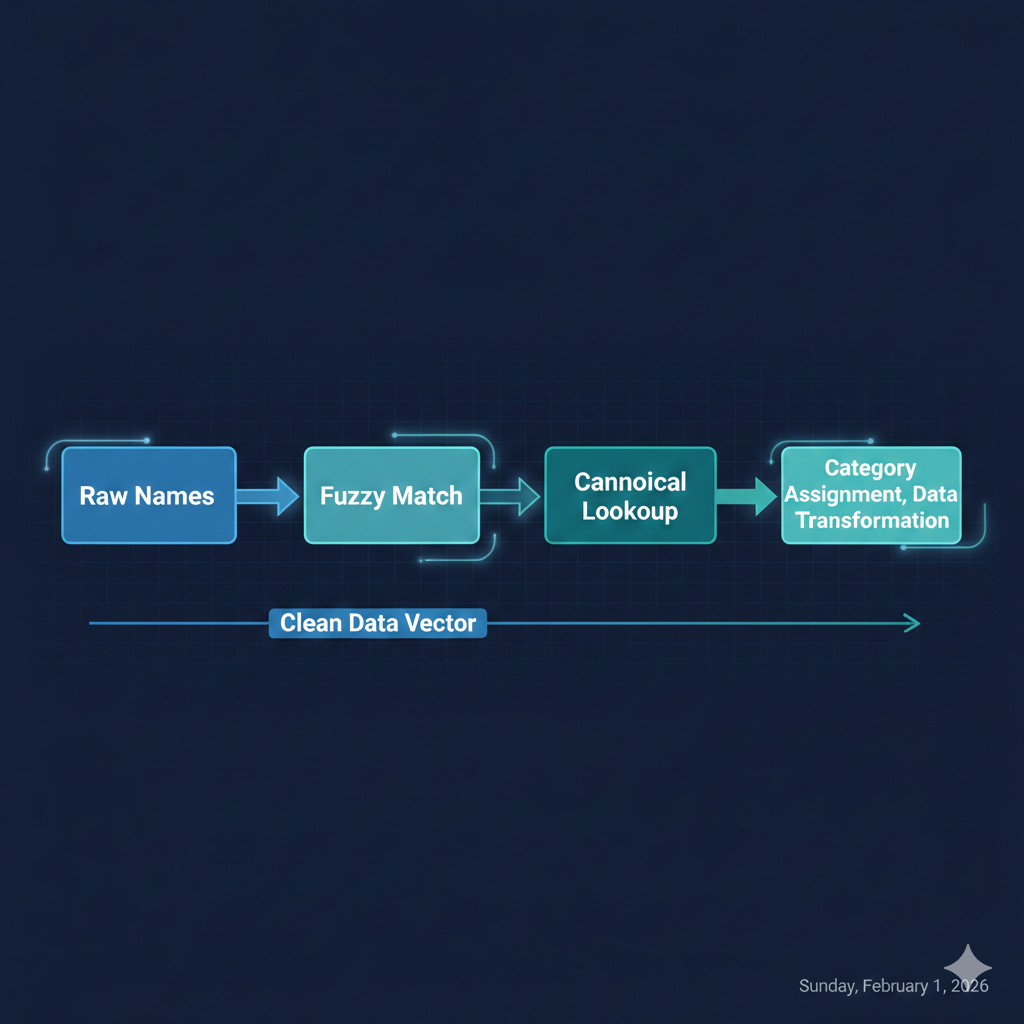
At the heart of any name normalization system is a mapping table that connects raw input strings to standardized canonical names. This approach separates the messy reality of user input from the clean structure your application logic requires.
from dataclasses import dataclassfrom enum import Enumfrom typing import Optional
class EquipmentCategory(Enum):    FREE_WEIGHTS = "free_weights"    MACHINES = "machines"    CABLES = "cables"    CARDIO = "cardio"    BODYWEIGHT = "bodyweight"    ACCESSORIES = "accessories"
class EquipmentType(Enum):    DUMBBELL = "dumbbell"    BARBELL = "barbell"    KETTLEBELL = "kettlebell"    CABLE_MACHINE = "cable_machine"    SMITH_MACHINE = "smith_machine"    TREADMILL = "treadmill"    RESISTANCE_BAND = "resistance_band"    # ... more types
@dataclassclass CanonicalEquipment:    id: str    name: str    category: EquipmentCategory    equipment_type: EquipmentType    description: Optional[str] = None
@dataclassclass EquipmentAlias:    alias: str    canonical_id: str    confidence: float  # 0.0 to 1.0    source: str  # 'manual', 'fuzzy_match', 'user_confirmed'
The corresponding PostgreSQL schema provides the persistence layer with appropriate constraints and indexes for efficient lookup:
CREATE TABLE canonical_equipment (    id VARCHAR(50) PRIMARY KEY,    name VARCHAR(100) NOT NULL UNIQUE,    category VARCHAR(50) NOT NULL,    equipment_type VARCHAR(50) NOT NULL,    description TEXT,    created_at TIMESTAMP DEFAULT CURRENT_TIMESTAMP,    updated_at TIMESTAMP DEFAULT CURRENT_TIMESTAMP);
CREATE TABLE equipment_aliases (    alias VARCHAR(100) PRIMARY KEY,    canonical_id VARCHAR(50) NOT NULL REFERENCES canonical_equipment(id),    confidence DECIMAL(3,2) NOT NULL CHECK (confidence >= 0 AND confidence <= 1),    source VARCHAR(20) NOT NULL CHECK (source IN ('manual', 'fuzzy_match', 'user_confirmed')),    created_at TIMESTAMP DEFAULT CURRENT_TIMESTAMP,    last_used_at TIMESTAMP);
-- Case-insensitive alias lookupCREATE INDEX idx_alias_lower ON equipment_aliases (LOWER(alias));
-- Find all aliases for a canonical entryCREATE INDEX idx_canonical_lookup ON equipment_aliases (canonical_id);
💡 Pro Tip: Store aliases in lowercase for case-insensitive matching, but preserve the original case in a separate column if you need to display user-friendly versions.
Implementing fuzzy matching with rapidfuzz
Raw string matching fails when users introduce typos, abbreviations, or creative variations. Fuzzy matching algorithms calculate string similarity scores, enabling your system to suggest matches even when input doesn’t exactly match known aliases.
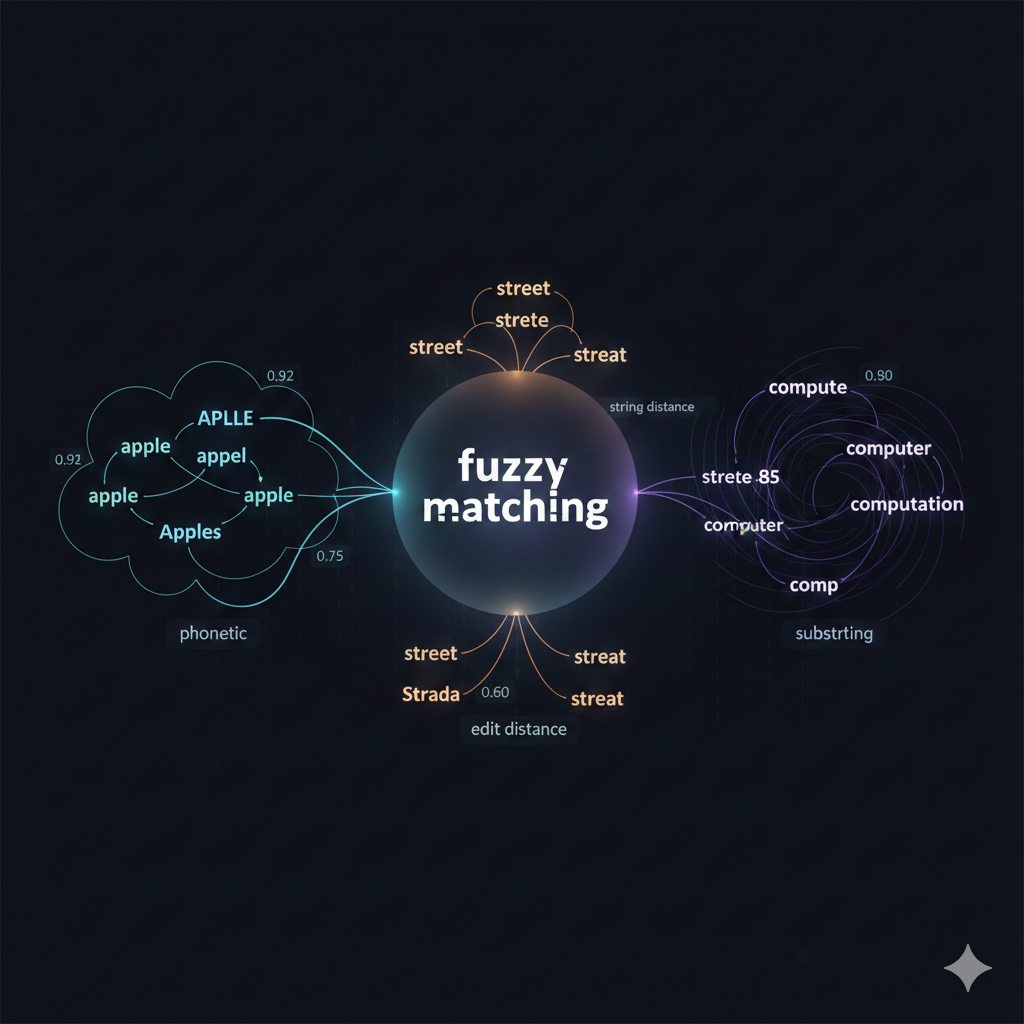
The rapidfuzz library provides fast, production-ready implementations of common similarity algorithms. It’s significantly faster than the older fuzzywuzzy library while maintaining API compatibility.
from rapidfuzz import fuzz, processfrom typing import List, Tuple, Optionalfrom dataclasses import dataclass
@dataclassclass MatchResult:    canonical_id: str    canonical_name: str    score: float    matched_alias: str
class EquipmentMatcher:    def __init__(self, threshold: float = 75.0):        self.threshold = threshold        self.aliases: dict[str, str] = {}  # alias -> canonical_id        self.canonical_names: dict[str, str] = {}  # id -> name
    def load_aliases(self, alias_data: List[Tuple[str, str, str]]):        """Load aliases from database: (alias, canonical_id, canonical_name)"""        for alias, canonical_id, canonical_name in alias_data:            self.aliases[alias.lower()] = canonical_id            self.canonical_names[canonical_id] = canonical_name
    def find_match(self, raw_input: str) -> Optional[MatchResult]:        """Find the best matching canonical equipment for raw input."""        normalized = raw_input.lower().strip()
        # Exact match first (fastest path)        if normalized in self.aliases:            canonical_id = self.aliases[normalized]            return MatchResult(                canonical_id=canonical_id,                canonical_name=self.canonical_names[canonical_id],                score=100.0,                matched_alias=normalized            )
        # Fuzzy match against all known aliases        matches = process.extractOne(            normalized,            self.aliases.keys(),            scorer=fuzz.WRatio,  # Weighted ratio handles partial matches well            score_cutoff=self.threshold        )
        if matches:            matched_alias, score, _ = matches            canonical_id = self.aliases[matched_alias]            return MatchResult(                canonical_id=canonical_id,                canonical_name=self.canonical_names[canonical_id],                score=score,                matched_alias=matched_alias            )
        return None
    def find_candidates(self, raw_input: str, limit: int = 5) -> List[MatchResult]:        """Find multiple candidate matches for manual review."""        normalized = raw_input.lower().strip()
        matches = process.extract(            normalized,            self.aliases.keys(),            scorer=fuzz.WRatio,            limit=limit        )
        results = []        for matched_alias, score, _ in matches:            canonical_id = self.aliases[matched_alias]            results.append(MatchResult(                canonical_id=canonical_id,                canonical_name=self.canonical_names[canonical_id],                score=score,                matched_alias=matched_alias            ))
        return results
The choice of similarity algorithm matters significantly. fuzz.WRatio (weighted ratio) handles partial matches and reordered words well, making it ideal for equipment names where “cable fly machine” and “fly machine cable” should match. For stricter matching, fuzz.ratio or fuzz.token_sort_ratio may be more appropriate.
# Initialize and load matchermatcher = EquipmentMatcher(threshold=70.0)matcher.load_aliases([    ("dumbbell", "eq_dumbbell", "Dumbbell"),    ("dumbbells", "eq_dumbbell", "Dumbbell"),    ("db", "eq_dumbbell", "Dumbbell"),    ("free weights", "eq_dumbbell", "Dumbbell"),    ("barbell", "eq_barbell", "Barbell"),    ("olympic bar", "eq_barbell", "Barbell"),])
# Test various inputstest_inputs = ["dumbbell", "dumbell", "DB's", "dumb bells", "barbel"]
for raw in test_inputs:    result = matcher.find_match(raw)    if result:        print(f"'{raw}' -> {result.canonical_name} (score: {result.score:.1f})")    else:        print(f"'{raw}' -> No match found")
# Output:# 'dumbbell' -> Dumbbell (score: 100.0)# 'dumbell' -> Dumbbell (score: 94.7)# 'DB's' -> Dumbbell (score: 80.0)# 'dumb bells' -> Dumbbell (score: 88.9)# 'barbel' -> Barbell (score: 92.3)
⚠️ Warning: Fuzzy matching can produce false positives. “Lat pulldown” might incorrectly match “Lat raise” with a high score. Always implement confidence thresholds and review workflows for ambiguous matches.
Building a category hierarchy
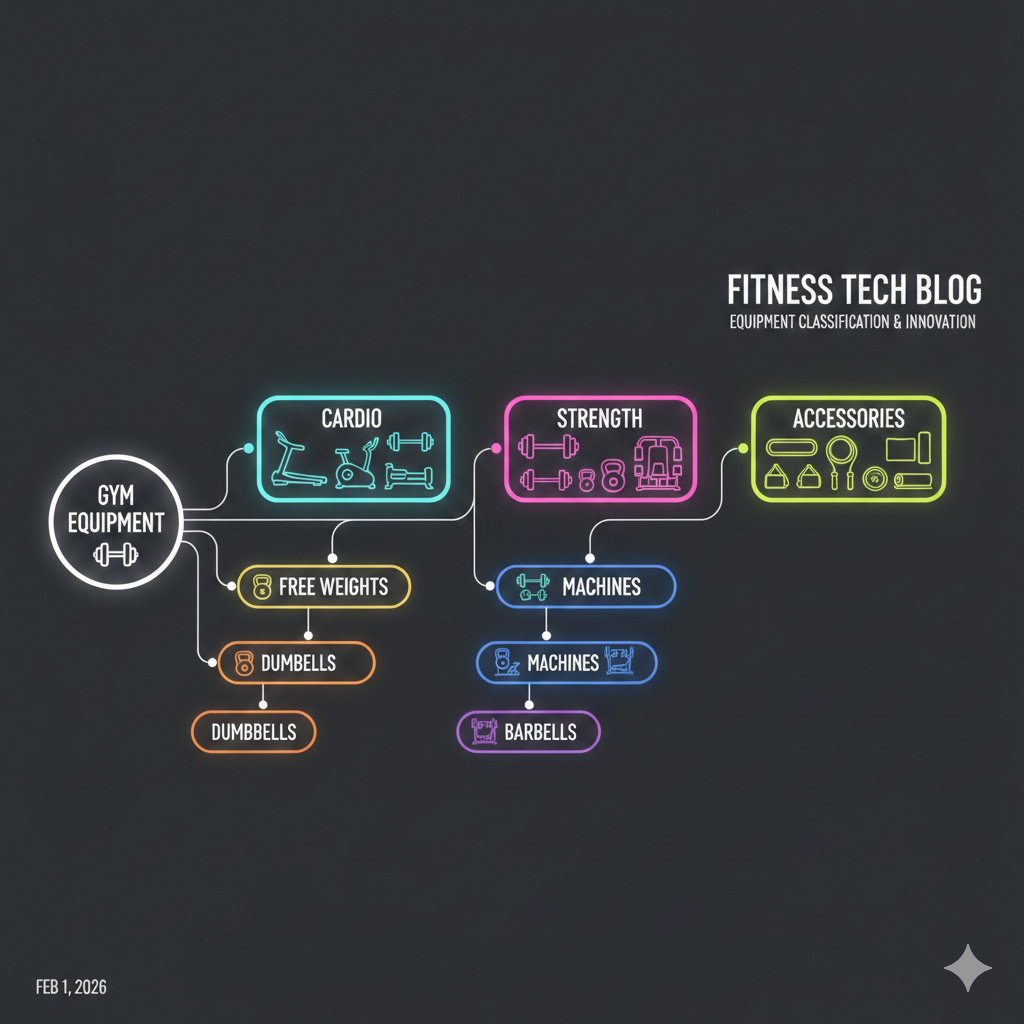
A flat list of equipment names quickly becomes unwieldy. A hierarchical taxonomy provides structure for navigation, filtering, and intelligent grouping. The three-level hierarchy of Category, Type, and Specific Item balances granularity with usability.
from typing import Dict, List, Setfrom dataclasses import dataclass, field
@dataclassclass TaxonomyNode:    id: str    name: str    parent_id: Optional[str] = None    children: List['TaxonomyNode'] = field(default_factory=list)    equipment_ids: Set[str] = field(default_factory=set)
class EquipmentTaxonomy:    def __init__(self):        self.nodes: Dict[str, TaxonomyNode] = {}        self._build_default_taxonomy()
    def _build_default_taxonomy(self):        """Initialize the standard equipment taxonomy."""        # Level 1: Categories        categories = {            "free_weights": "Free Weights",            "machines": "Machines",            "cables": "Cable Equipment",            "cardio": "Cardio Equipment",            "bodyweight": "Bodyweight",            "accessories": "Accessories"        }
        for cat_id, cat_name in categories.items():            self.nodes[cat_id] = TaxonomyNode(id=cat_id, name=cat_name)
        # Level 2: Types (subset shown)        types = [            ("dumbbell", "Dumbbells", "free_weights"),            ("barbell", "Barbells", "free_weights"),            ("kettlebell", "Kettlebells", "free_weights"),            ("weight_plate", "Weight Plates", "free_weights"),            ("cable_machine", "Cable Machines", "cables"),            ("pulley_system", "Pulley Systems", "cables"),            ("leg_press", "Leg Press", "machines"),            ("smith_machine", "Smith Machine", "machines"),            ("treadmill", "Treadmills", "cardio"),            ("rowing_machine", "Rowing Machines", "cardio"),        ]
        for type_id, type_name, parent_id in types:            node = TaxonomyNode(id=type_id, name=type_name, parent_id=parent_id)            self.nodes[type_id] = node            self.nodes[parent_id].children.append(node)
    def get_ancestors(self, node_id: str) -> List[TaxonomyNode]:        """Return all ancestors from node to root."""        ancestors = []        current = self.nodes.get(node_id)
        while current and current.parent_id:            parent = self.nodes.get(current.parent_id)            if parent:                ancestors.append(parent)                current = parent            else:                break
        return ancestors
    def get_breadcrumb(self, node_id: str) -> str:        """Generate a breadcrumb path string."""        node = self.nodes.get(node_id)        if not node:            return ""
        ancestors = self.get_ancestors(node_id)        path = [a.name for a in reversed(ancestors)] + [node.name]        return " > ".join(path)
This structure enables powerful queries and navigation:
taxonomy = EquipmentTaxonomy()
# Get breadcrumb for displayprint(taxonomy.get_breadcrumb("dumbbell"))# Output: "Free Weights > Dumbbells"
print(taxonomy.get_breadcrumb("cable_machine"))# Output: "Cable Equipment > Cable Machines"
# Find all equipment in a categoryfree_weights = taxonomy.nodes["free_weights"]print(f"Free weight types: {[c.name for c in free_weights.children]}")# Output: Free weight types: ['Dumbbells', 'Barbells', 'Kettlebells', 'Weight Plates']
The manual curation workflow
Automated fuzzy matching handles the majority of cases, but edge cases require human judgment. A well-designed curation workflow captures these decisions efficiently while building your alias database over time.
from datetime import datetimefrom enum import Enumfrom typing import Optional, Listimport psycopg2from psycopg2.extras import execute_values
class CurationStatus(Enum):    PENDING = "pending"    APPROVED = "approved"    REJECTED = "rejected"    NEEDS_NEW_CANONICAL = "needs_new_canonical"
@dataclassclass CurationTask:    id: int    raw_input: str    suggested_canonical_id: Optional[str]    suggested_score: Optional[float]    status: CurationStatus    curator_notes: Optional[str]    created_at: datetime
class CurationService:    def __init__(self, db_connection, matcher: EquipmentMatcher):        self.conn = db_connection        self.matcher = matcher        self.auto_approve_threshold = 95.0        self.auto_reject_threshold = 50.0
    def process_raw_input(self, raw_input: str) -> CurationTask:        """Process a new raw input string and create/resolve curation task."""        match = self.matcher.find_match(raw_input)
        if match and match.score >= self.auto_approve_threshold:            # High confidence: auto-approve and add alias            self._add_alias(raw_input, match.canonical_id, match.score, "fuzzy_match")            return self._create_task(                raw_input, match.canonical_id, match.score,                CurationStatus.APPROVED, "Auto-approved (high confidence)"            )
        elif match and match.score >= self.auto_reject_threshold:            # Medium confidence: queue for human review            return self._create_task(                raw_input, match.canonical_id, match.score,                CurationStatus.PENDING, None            )
        else:            # Low/no confidence: might need new canonical entry            return self._create_task(                raw_input,                match.canonical_id if match else None,                match.score if match else None,                CurationStatus.NEEDS_NEW_CANONICAL, None            )
    def approve_suggestion(self, task_id: int, curator_id: str):        """Curator approves the suggested mapping."""        task = self._get_task(task_id)        if task.suggested_canonical_id:            self._add_alias(                task.raw_input,                task.suggested_canonical_id,                1.0,  # Manual approval = full confidence                "user_confirmed"            )            self._update_task_status(task_id, CurationStatus.APPROVED, curator_id)
    def assign_different_canonical(self, task_id: int, canonical_id: str, curator_id: str):        """Curator assigns a different canonical than suggested."""        task = self._get_task(task_id)        self._add_alias(task.raw_input, canonical_id, 1.0, "user_confirmed")        self._update_task_status(task_id, CurationStatus.APPROVED, curator_id)
    def _add_alias(self, alias: str, canonical_id: str, confidence: float, source: str):        """Insert or update an alias mapping."""        with self.conn.cursor() as cur:            cur.execute("""                INSERT INTO equipment_aliases (alias, canonical_id, confidence, source)                VALUES (%s, %s, %s, %s)                ON CONFLICT (alias) DO UPDATE SET                    canonical_id = EXCLUDED.canonical_id,                    confidence = EXCLUDED.confidence,                    source = EXCLUDED.source,                    last_used_at = CURRENT_TIMESTAMP            """, (alias.lower(), canonical_id, confidence, source))            self.conn.commit()
        # Update in-memory matcher        self.matcher.aliases[alias.lower()] = canonical_id
📝 Note: Track the source of each alias (manual, fuzzy_match, user_confirmed) to understand data quality. Manual entries are most reliable; auto-matched entries may need periodic review.
Maintaining mappings over time
A canonical mapping system is never “done.” New equipment appears, terminology evolves, and edge cases surface. Establish maintenance processes to keep your system accurate.
Periodic alias review: Schedule quarterly reviews of aliases added via fuzzy matching with confidence scores below 90%. These are most likely to contain errors.
-- Find potentially problematic auto-matched aliasesSELECT    a.alias,    a.canonical_id,    e.name as canonical_name,    a.confidence,    a.created_atFROM equipment_aliases aJOIN canonical_equipment e ON a.canonical_id = e.idWHERE a.source = 'fuzzy_match'  AND a.confidence < 0.90ORDER BY a.confidence ASCLIMIT 50;
-- Find canonical entries with suspiciously few aliasesSELECT    e.id,    e.name,    COUNT(a.alias) as alias_countFROM canonical_equipment eLEFT JOIN equipment_aliases a ON e.id = a.canonical_idGROUP BY e.id, e.nameHAVING COUNT(a.alias) < 3ORDER BY alias_count;
-- Detect potential duplicates in canonical entriesSELECT    e1.id as id1, e1.name as name1,    e2.id as id2, e2.name as name2FROM canonical_equipment e1JOIN canonical_equipment e2 ON e1.id < e2.idWHERE similarity(e1.name, e2.name) > 0.8;  -- Requires pg_trgm extension
Usage tracking: Log which aliases are actually used in production. Unused aliases may indicate dead entries or suggest consolidation opportunities. High-frequency aliases for the same canonical entry reveal the most common user terminology.
Conflict resolution: When two curators disagree on a mapping, or when an alias could reasonably map to multiple canonical entries, establish a tiebreaker process. Consider context (which exercises use this equipment?), frequency (which interpretation is more common?), and specificity (prefer more specific matches).
Key takeaways
Building a robust equipment categorization system requires balancing automation with human oversight. The key components work together:
- Canonical mapping tables provide the foundation for normalization, connecting messy input to clean identifiers
- Fuzzy matching with rapidfuzz handles typos and variations automatically, with configurable thresholds for confidence
- Hierarchical taxonomy enables navigation, filtering, and intelligent grouping across equipment types
- Curation workflows capture human decisions for edge cases while continuously improving the alias database
- Maintenance processes ensure long-term accuracy through periodic review and usage tracking
The same patterns apply beyond fitness equipment. Product catalogs, medical terminology, inventory systems, and any domain with user-generated references to standardized entities benefit from this architecture. Start with manual curation to build high-quality seed data, layer in fuzzy matching for automation, and establish review processes before your alias database grows unwieldy.
The investment in proper categorization pays dividends across your application: cleaner analytics, better search results, more accurate recommendations, and a foundation that scales as your domain knowledge grows.