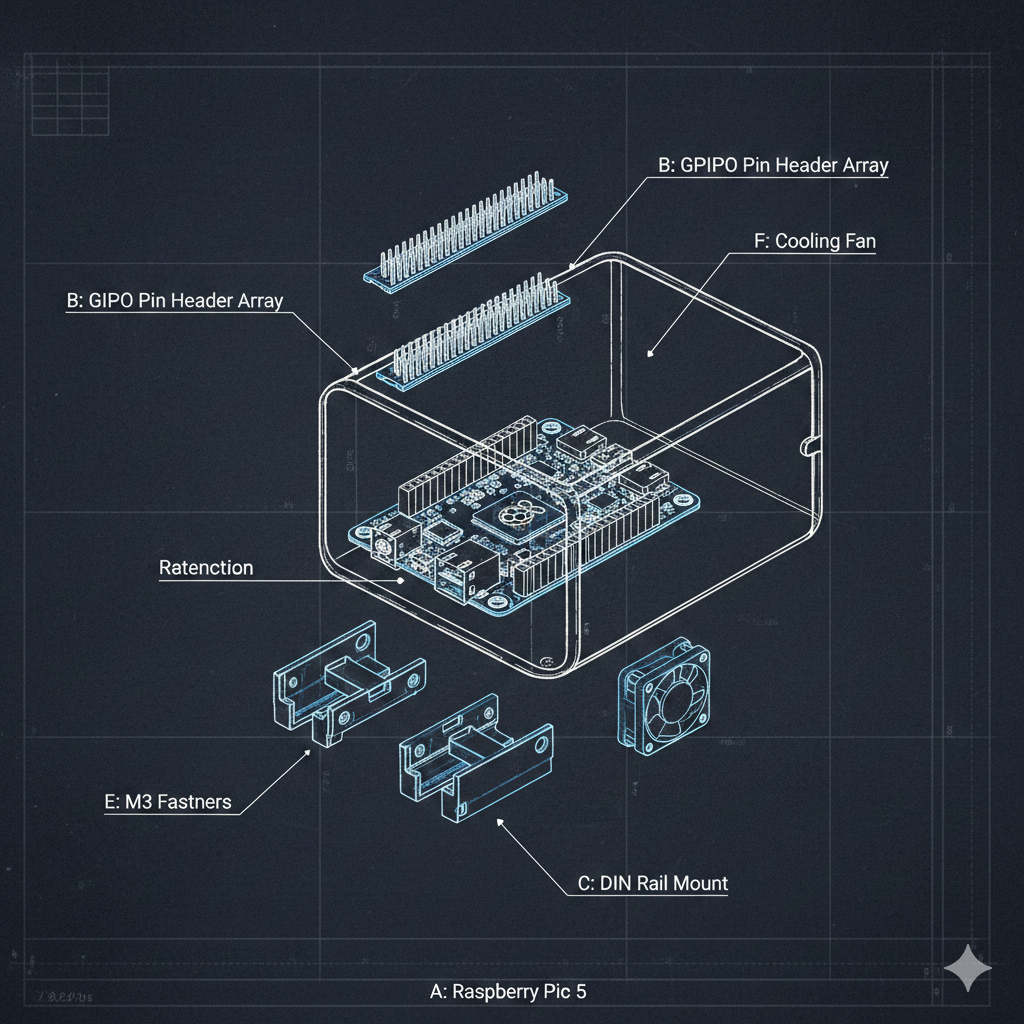
Creating Electronics Component Adapters with cq_electronics
When designing electronic enclosures, you need accurate 3D models of the components that will fit inside. PCB dimensions, mounting hole locations, connector heights, and clearance requirements all drive the enclosure geometry. Manually modeling a Raspberry Pi or DIN rail clip every time wastes hours that could be spent on the actual design work.
The cq_electronics library provides ready-to-use parametric models of common electronic components built on CadQuery. However, integrating these models into a larger CAD system requires an adapter layer that normalizes the library’s API, preserves assembly structures with colors, and exposes component metadata like dimensions and mounting holes.
This article demonstrates how to build an ElectronicsSource adapter that wraps cq_electronics components, making them accessible through a unified registry interface. You will learn how to handle Assembly-to-Workplane conversion, extract metadata from component classes, and preserve color information for STEP exports.
Understanding cq_electronics components
The cq_electronics library organizes components into categories: boards (Raspberry Pi), connectors (pin headers, RJ45 jacks), SMD packages (BGA chips), and mechanical parts (DIN rail, mounting clips). Each component is a Python class that generates CadQuery geometry when instantiated.
from cq_electronics.rpi.rpi3b import RPi3bfrom cq_electronics.connectors.headers import PinHeaderfrom cq_electronics.mechanical.din_rail import TopHat
# Raspberry Pi 3B - returns Assembly with colored sub-partsrpi = RPi3b(simple=True)rpi_geometry = rpi.cq_object  # cq.Assembly
# Pin header - 2x20 GPIO headergpio = PinHeader(rows=2, columns=20, above=8.5, below=3, simple=True)gpio_geometry = gpio.cq_object  # cq.Workplane
# DIN rail section - 150mm lengthrail = TopHat(length=150, depth=7.5, slots=True)rail_geometry = rail.cq_object  # cq.Workplane
The challenge is that components return different types. The Raspberry Pi returns a cq.Assembly with individually colored parts (PCB substrate, Ethernet port, USB ports). Simpler components like pin headers return a cq.Workplane. An adapter needs to normalize these differences while preserving the rich assembly data when available.
Available components in the catalog
The adapter exposes a curated selection of cq_electronics components organized by category:
| Name | Category | Required Params | Description |
|---|---|---|---|
RPi3b | board | - | Raspberry Pi 3B single-board computer |
PinHeader | connector | - | Through-hole pin header |
JackSurfaceMount | connector | - | RJ45 Ethernet jack (surface mount) |
BGA | smd | length, width | Ball Grid Array chip package |
DinClip | mechanical | - | DIN rail mounting clip |
TopHat | mechanical | length | Top-hat (TH35) DIN rail section |
PiTrayClip | mounting | - | Raspberry Pi mounting tray clip |
Each component has a parameter schema that defines valid inputs. For example, BGA requires both length and width since these vary by chip package. The TopHat DIN rail requires a length parameter but defaults to standard depth (7.5mm) and includes mounting slots.
Note: The
simple=Trueparameter available on most components generates simplified geometry optimized for performance. Setsimple=Falsewhen you need full detail for renders or interference checks.
The adapter pattern architecture
The ElectronicsSource class implements the ComponentSource interface, translating between the unified registry API and cq_electronics internals:
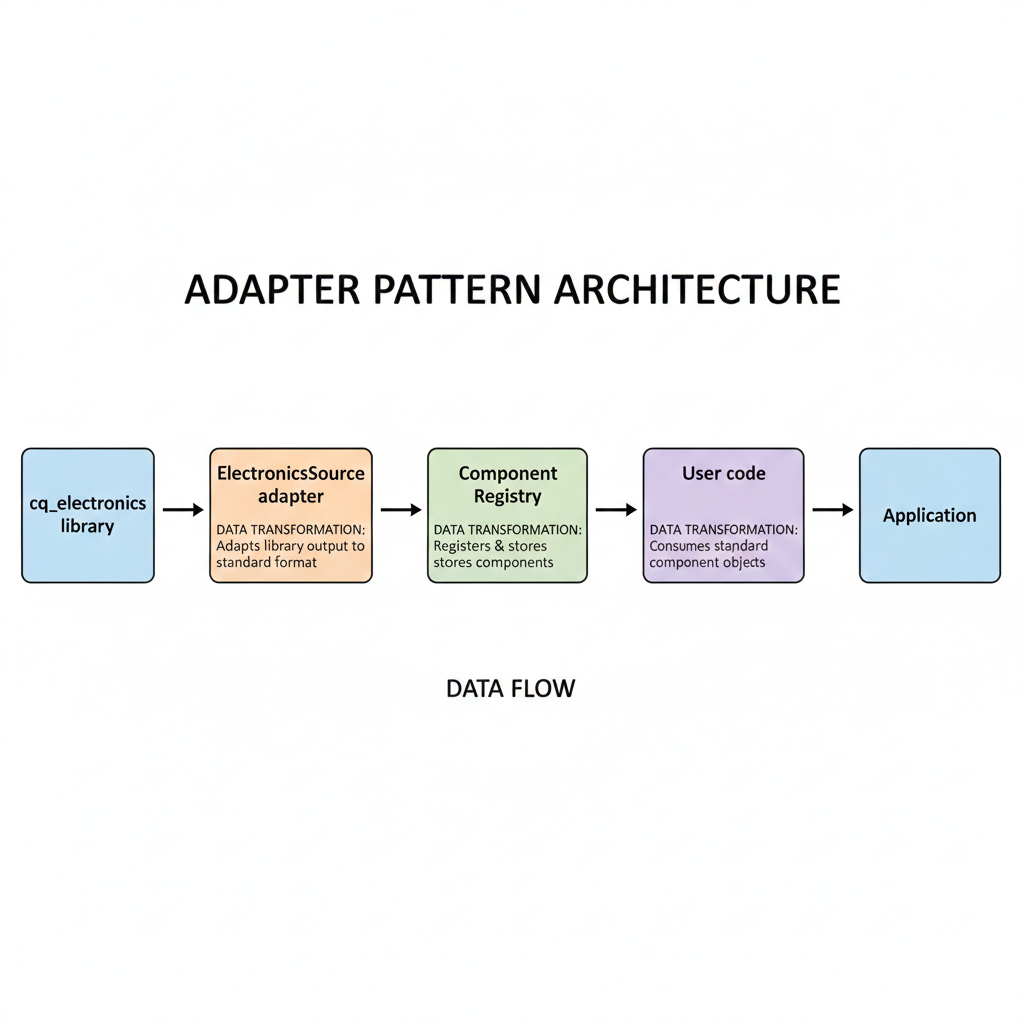
┌─────────────────────────────────────────────────────────────┐│ Application Code ││ registry.get("RPi3b", simple=True) │└─────────────────────────────┬───────────────────────────────┘ │┌─────────────────────────────▼───────────────────────────────┐│ ComponentRegistry ││ - Caching - Source aggregation - Unified get() API │└─────────────────────────────┬───────────────────────────────┘ │┌─────────────────────────────▼───────────────────────────────┐│ ElectronicsSource ││ - Parameter validation - Metadata extraction ││ - Assembly preservation - Type normalization │└─────────────────────────────┬───────────────────────────────┘ │┌─────────────────────────────▼───────────────────────────────┐│ cq_electronics ││ RPi3b PinHeader BGA TopHat DinClip PiTrayClip │└─────────────────────────────────────────────────────────────┘The component catalog maps short names to their import paths and parameter schemas:
COMPONENT_CATALOG: dict[str, tuple[str, str, str, str, list[str], dict[str, Any]]] = { # (module_path, class_name, category, description, required_params, default_params) "RPi3b": ( "cq_electronics.rpi.rpi3b", "RPi3b", "board", "Raspberry Pi 3B single-board computer", [], {"simple": True}, ), "PinHeader": ( "cq_electronics.connectors.headers", "PinHeader", "connector", "Through-hole pin header", [], {"rows": 1, "columns": 1, "above": 7, "below": 3, "simple": True}, ), "BGA": ( "cq_electronics.smd.bga", "BGA", "smd", "Ball Grid Array chip package", ["length", "width"], {"height": 1, "simple": True}, ), "TopHat": ( "cq_electronics.mechanical.din_rail", "TopHat", "mechanical", "Top-hat (TH35) DIN rail section", ["length"], {"depth": 7.5, "slots": True}, ),}This declarative catalog makes adding new components straightforward - just add a tuple with the import path, class name, category, and parameter information.
Parameter validation and error handling
The adapter validates parameters before passing them to cq_electronics, providing clear error messages when inputs are invalid:
PARAM_SCHEMAS: dict[str, dict[str, dict[str, Any]]] = {    "BGA": {        "length": {"type": (int, float), "min": 0.1, "required": True},        "width": {"type": (int, float), "min": 0.1, "required": True},        "height": {"type": (int, float), "min": 0.1},        "simple": {"type": bool},    },    "PinHeader": {        "rows": {"type": int, "min": 1, "max": 100},        "columns": {"type": int, "min": 1, "max": 100},        "above": {"type": (int, float), "min": 0},        "below": {"type": (int, float), "min": 0},        "simple": {"type": bool},    },}
def validate_params(component_name: str, params: dict[str, Any], strict: bool = True) -> dict[str, Any]:    """Validate parameters and return filtered params."""    schema = PARAM_SCHEMAS.get(component_name, {})    validated_params = {}    errors = []
    # Check for unknown parameters    known_params = set(schema.keys())    provided_params = set(params.keys())    unknown_params = provided_params - known_params
    if unknown_params and strict:        errors.append(            f"Unknown parameter(s) for {component_name}: {sorted(unknown_params)}. "            f"Valid parameters: {sorted(known_params) if known_params else 'none'}"        )
    # Validate each parameter against its schema    for param_name, value in params.items():        if param_name in unknown_params:            continue
        param_schema = schema.get(param_name, {})        expected_type = param_schema.get("type")        min_val = param_schema.get("min")        max_val = param_schema.get("max")
        # Type checking with support for multiple types        if expected_type is not None:            if isinstance(expected_type, tuple):                if not isinstance(value, expected_type):                    type_names = " or ".join(t.__name__ for t in expected_type)                    errors.append(f"Parameter '{param_name}' must be {type_names}")                    continue            elif not isinstance(value, expected_type):                errors.append(f"Parameter '{param_name}' must be {expected_type.__name__}")                continue
        # Range validation        if isinstance(value, (int, float)) and not isinstance(value, bool):            if min_val is not None and value < min_val:                errors.append(f"Parameter '{param_name}' must be >= {min_val}, got {value}")                continue
        validated_params[param_name] = value
    if errors:        raise ParameterValidationError(            f"Invalid parameters for {component_name}:\n  - " + "\n  - ".join(errors)        )
    return validated_params
This validation catches common errors early with helpful messages:
# Missing required parameterregistry.get("BGA", width=10)# ValueError: Missing required parameters for BGA: ['length']. Required: [length: int or float, width: int or float]
# Unknown parameterregistry.get("TopHat", length=100, simple=True)# ParameterValidationError: Unknown parameter(s) for TopHat: ['simple']. Valid parameters: ['depth', 'length', 'slots']
# Out of rangeregistry.get("PinHeader", rows=0)# ParameterValidationError: Parameter 'rows' must be >= 1, got 0
Pro Tip: Pass
strict=Falseto silently filter unknown parameters instead of raising errors. This is useful when migrating code between library versions.
Exposing component metadata
Electronic components carry valuable metadata beyond geometry - dimensions for cutouts, mounting hole positions for standoffs, and class constants from the underlying library. The ElectronicsComponent class exposes this through dedicated properties:
class ElectronicsComponent(Component):    """Component backed by cq_electronics library."""
    @property    def metadata(self) -> dict[str, Any]:        """Extract UPPER_CASE class constants."""        instance = self._ensure_instance()        metadata = {}        for name in dir(instance):            if name.isupper() and not name.startswith("_"):                try:                    value = getattr(instance, name)                    if isinstance(value, (int, float, str, bool)):                        metadata[name] = value                except Exception:                    pass        return metadata
    @property    def mounting_holes(self) -> list[tuple[float, float]] | None:        """Get mounting hole locations as [(x, y), ...]."""        instance = self._ensure_instance()        if hasattr(instance, "hole_points"):            return instance.hole_points        return None
    @property    def dimensions(self) -> tuple[float, float, float] | None:        """Get (width, height, thickness) from metadata."""        meta = self.metadata        width = meta.get("WIDTH")        height = meta.get("HEIGHT")        depth = meta.get("THICKNESS") or meta.get("DEPTH")        if width is not None and height is not None:            return (float(width), float(height), float(depth) if depth else 0.0)        return None
Using these properties makes enclosure design straightforward:
from semicad import get_registry
registry = get_registry()rpi = registry.get("RPi3b")
# Get board dimensions for enclosure sizingwidth, height, thickness = rpi.dimensions  # (85.0, 56.0, 1.5)
# Position mounting holes for standoffsfor x, y in rpi.mounting_holes:    # Create M2.5 standoff at each hole position    standoff = create_standoff(x, y, height=8)
# Access all class constantsprint(rpi.metadata)# {'WIDTH': 85, 'HEIGHT': 56, 'THICKNESS': 1.5, 'HOLE_DIAMETER': 2.7,#  'HOLE_CENTERS_LONG': 49, 'HOLE_OFFSET_FROM_EDGE': 3.5, ...}
# Access underlying instance for advanced usagerpi.raw_instance.hole_points  # Direct cq_electronics access
Preserving assembly structure and colors
The Raspberry Pi component returns a cq.Assembly with individually colored parts - the PCB substrate, Ethernet port, USB ports, and GPIO header each have distinct colors. Simply converting to a Workplane via toCompound() loses this information. The adapter preserves assembly metadata:
@dataclassclass PartInfo:    """Information about a single part within an assembly."""    name: str    color: tuple[float, float, float, float] | None = None  # RGBA 0-1
@dataclassclass AssemblyInfo:    """Metadata about an assembly structure."""    parts: list[PartInfo] = field(default_factory=list)
    @classmethod    def from_assembly(cls, asm: cq.Assembly) -> "AssemblyInfo":        """Extract metadata from a CadQuery Assembly."""        parts = []        for name, _ in asm.traverse():            color_tuple = None            for child in asm.children:                if child.name == name and child.color is not None:                    color_tuple = child.color.toTuple()                    break            parts.append(PartInfo(name=name, color=color_tuple))        return cls(parts=parts)
class ElectronicsComponent(Component):    def build(self) -> cq.Workplane:        """Build geometry, preserving assembly metadata."""        instance = self._ensure_instance()        cq_obj = instance.cq_object
        if isinstance(cq_obj, cq.Assembly):            # Preserve original assembly and extract metadata            self._assembly = cq_obj            self._assembly_info = AssemblyInfo.from_assembly(cq_obj)            compound = cq_obj.toCompound()            return cq.Workplane("XY").add(compound)        elif isinstance(cq_obj, cq.Workplane):            return cq_obj        else:            return cq.Workplane("XY").add(cq_obj)
The preserved assembly data is accessible through component properties:
rpi = registry.get("RPi3b")
# Check if component has assembly structureif rpi.has_assembly:    # List all sub-parts    print(rpi.list_parts())    # ['rpi__pcb_substrate', 'rpi__ethernet_port', 'rpi__usb_ports', ...]
    # Get color mapping for rendering    colors = rpi.get_color_map()    # {'rpi__pcb_substrate': (0.85, 0.75, 0.55, 1.0), ...}
    # Extract specific sub-part geometry    ethernet = rpi.get_part("rpi__ethernet_port")    usb = rpi.get_part("rpi__usb_ports")
    # Export with colors preserved (STEP format)    rpi.assembly.save("raspberry_pi_colored.step")
# The geometry property returns normalized Workplane for positioningrpi_geometry = rpi.geometry  # Always cq.Workplane
This dual-track approach gives you the best of both worlds: normalized Workplane for assembly positioning and transformations, plus the original Assembly for colored exports and sub-part access.
Practical enclosure design example
Bringing everything together, here is how you would design an enclosure for a Raspberry Pi with DIN rail mounting:
from semicad import get_registryimport cadquery as cq
registry = get_registry()
# Get the Raspberry Pi with metadatarpi = registry.get("RPi3b")rpi_width, rpi_height, rpi_thickness = rpi.dimensions
# Get DIN rail clip for industrial mountingdin_clip = registry.get("DinClip")
# Create GPIO header for cable clearancegpio = registry.get("PinHeader", rows=2, columns=20, above=8.5)
# Enclosure parameterswall_thickness = 2.5clearance = 1.0standoff_height = 8.0
# Calculate enclosure dimensions from component metadataenclosure_width = rpi_width + 2 * (wall_thickness + clearance)enclosure_height = rpi_height + 2 * (wall_thickness + clearance)enclosure_depth = standoff_height + rpi_thickness + 15  # GPIO clearance
# Create enclosure shellenclosure = (    cq.Workplane("XY")    .box(enclosure_width, enclosure_height, enclosure_depth)    .faces(">Z")    .shell(-wall_thickness))
# Add mounting standoffs at exact hole positionsfor x, y in rpi.mounting_holes:    enclosure = (        enclosure        .faces("<Z")        .workplane()        .moveTo(x, y)        .circle(4.0)  # Standoff outer diameter        .extrude(standoff_height)        .faces(">Z")        .workplane()        .moveTo(x, y)        .hole(2.15)  # M2.5 tap hole    )
# Position Raspberry Pi on standoffsrpi_positioned = rpi.geometry.translate((0, 0, standoff_height + wall_thickness))
The metadata-driven approach means the enclosure automatically adjusts when you switch to a different board - just replace RPi3b with another board component, and the mounting holes and dimensions update accordingly.
Utility constants for hole sizing
The adapter also exposes standard hole sizes from cq_electronics for creating accurate mounting holes:
from semicad.sources.electronics import HOLE_SIZES, COLORS
# Metric hole diameters (mm)HOLE_SIZES["M2R5_TAP_HOLE"]        # 2.15mm - M2.5 tap drillHOLE_SIZES["M4_TAP_HOLE"]          # 3.2mm  - M4 tap drillHOLE_SIZES["M4_CLEARANCE_NORMAL"]  # 4.5mm  - M4 through holeHOLE_SIZES["M4_COUNTERSINK"]       # 9.4mm  - M4 countersinkHOLE_SIZES["M_COUNTERSINK_ANGLE"]  # 90 degrees
# Standard component colors (RGB 0-1)COLORS["pcb_substrate_chiffon"]    # PCB base colorCOLORS["solder_mask_green"]        # Green solder maskCOLORS["black_plastic"]            # Connector housingsCOLORS["gold_plate"]               # Gold-plated contacts
These constants ensure your mounting holes match industry standards without memorizing drill sizes.
Key takeaways
Building an adapter for cq_electronics taught several valuable lessons about integrating third-party CAD libraries:
- Normalize return types - Components may return Assembly or Workplane; the adapter should provide a consistent interface while preserving rich data when available
- Validate parameters early - Clear error messages with valid options save debugging time when components fail to build
- Extract metadata proactively - Dimensions, mounting holes, and class constants are often more valuable than geometry for design automation
- Preserve assembly structure - Store the original Assembly and its metadata separately from the normalized Workplane to support both positioning and colored exports
- Use declarative catalogs - A data-driven component catalog makes adding new components trivial and keeps import logic out of business code
The adapter pattern transforms cq_electronics from a standalone library into a first-class citizen of the parametric CAD ecosystem, accessible through the same unified interface as fasteners, custom components, and community models.