ClickUp to Custom Kanban: Migration Strategies
You’ve been using ClickUp for project management, and it works. The boards are organized, the workflows are defined, and your team knows where to find their tasks. But then you start using Claude Code for development, and a friction emerges: context-switching between your AI assistant and your project management tool breaks the flow.
What if your AI could create tasks, update statuses, and query your backlog without ever leaving the terminal? What if you owned your task data completely, with the flexibility to build custom integrations that SaaS tools will never prioritize? This is the promise of migrating from ClickUp to a custom kanban system built around MCP (Model Context Protocol) integration.
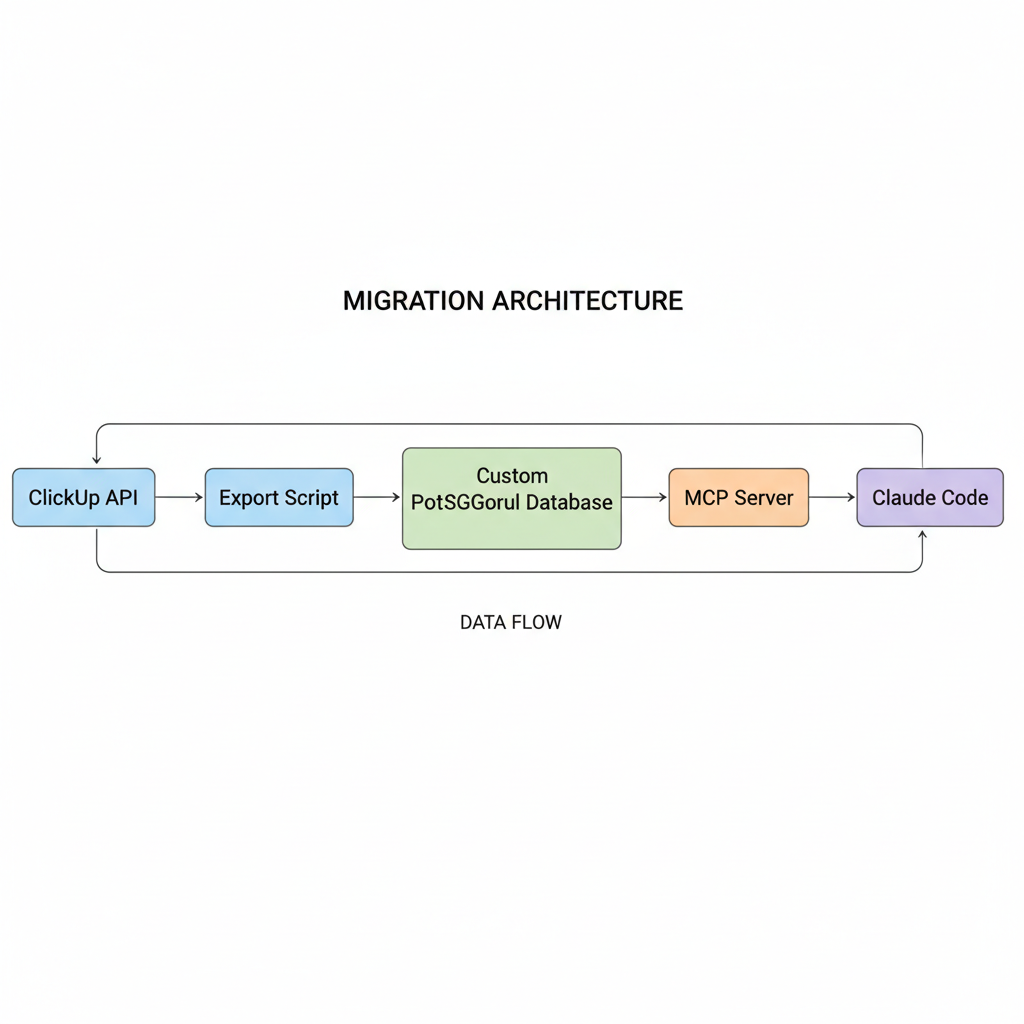
In this article, we’ll walk through a complete migration strategy: extracting your data from ClickUp’s API, designing a PostgreSQL schema optimized for AI workflows, and building an MCP server that transforms your kanban into a first-class tool for Claude Code.
Why migrate from SaaS to custom
Before writing migration scripts, it’s worth examining whether this migration makes sense for your situation. SaaS tools like ClickUp provide polished UIs, mobile apps, and team collaboration features that take years to build. Why give that up?
| Factor | ClickUp Advantage | Custom System Advantage |
|---|---|---|
| UI polish | Production-ready web/mobile apps | Terminal-native, AI-first |
| Team collaboration | Real-time sync, comments, mentions | Full control over sharing model |
| AI integration | Limited API, no MCP support | Native MCP tools, Claude Code integration |
| Data ownership | Vendor lock-in, export limitations | PostgreSQL, full query access |
| Customization | Restricted to available features | Build exactly what you need |
| Cost at scale | Per-seat pricing adds up | Self-hosted, predictable costs |
The compelling reasons for migration center on AI integration and data ownership. ClickUp’s API is designed for web integrations, not AI assistants that need to create and manage tasks conversationally. Building a custom system means your kanban becomes a native tool in Claude Code’s toolkit.
💡 Pro Tip: Start with a parallel system. Keep ClickUp for team collaboration while building the custom system for your AI-assisted solo workflows. Migrate incrementally based on what works.
Extracting data from ClickUp’s API
ClickUp’s API provides comprehensive access to workspaces, spaces, folders, lists, and tasks. The extraction process involves navigating this hierarchy and flattening it into a portable format.
First, set up authentication and the basic client:
import osimport jsonimport requestsfrom datetime import datetimefrom typing import Generatorfrom dataclasses import dataclass, asdict
CLICKUP_API_BASE = "https://api.clickup.com/api/v2"
@dataclassclass ClickUpTask:    id: str    name: str    description: str    status: str    priority: int | None    due_date: datetime | None    created_at: datetime    updated_at: datetime    list_id: str    list_name: str    space_id: str    space_name: str    tags: list[str]    assignees: list[str]    custom_fields: dict
class ClickUpExporter:    def __init__(self, api_token: str):        self.api_token = api_token        self.session = requests.Session()        self.session.headers.update({            "Authorization": api_token,            "Content-Type": "application/json"        })
    def _get(self, endpoint: str, params: dict = None) -> dict:        """Make authenticated GET request to ClickUp API."""        response = self.session.get(            f"{CLICKUP_API_BASE}{endpoint}",            params=params        )        response.raise_for_status()        return response.json()
    def get_workspaces(self) -> list[dict]:        """Fetch all accessible workspaces (teams in ClickUp terminology)."""        return self._get("/team")["teams"]
    def get_spaces(self, workspace_id: str) -> list[dict]:        """Fetch all spaces within a workspace."""        return self._get(f"/team/{workspace_id}/space")["spaces"]
    def get_lists(self, space_id: str) -> list[dict]:        """Fetch all lists within a space (including folderless lists)."""        # Get folderless lists        folderless = self._get(f"/space/{space_id}/list")["lists"]
        # Get folders and their lists        folders = self._get(f"/space/{space_id}/folder")["folders"]        folder_lists = []        for folder in folders:            folder_lists.extend(                self._get(f"/folder/{folder['id']}/list")["lists"]            )
        return folderless + folder_lists
    def get_tasks(self, list_id: str) -> Generator[ClickUpTask, None, None]:        """Fetch all tasks from a list with pagination."""        page = 0        while True:            response = self._get(                f"/list/{list_id}/task",                params={"page": page, "include_closed": "true"}            )            tasks = response.get("tasks", [])
            if not tasks:                break
            for task in tasks:                yield self._parse_task(task)
            page += 1
    def _parse_task(self, raw: dict) -> ClickUpTask:        """Convert raw API response to structured task object."""        return ClickUpTask(            id=raw["id"],            name=raw["name"],            description=raw.get("description", ""),            status=raw["status"]["status"],            priority=raw.get("priority", {}).get("orderindex"),            due_date=datetime.fromtimestamp(int(raw["due_date"]) / 1000)                     if raw.get("due_date") else None,            created_at=datetime.fromtimestamp(int(raw["date_created"]) / 1000),            updated_at=datetime.fromtimestamp(int(raw["date_updated"]) / 1000),            list_id=raw["list"]["id"],            list_name=raw["list"]["name"],            space_id=raw["space"]["id"],            space_name=raw.get("space", {}).get("name", ""),            tags=[tag["name"] for tag in raw.get("tags", [])],            assignees=[a["username"] for a in raw.get("assignees", [])],            custom_fields={                cf["name"]: cf.get("value")                for cf in raw.get("custom_fields", [])            }        )
    def export_all(self, output_path: str) -> int:        """Export all tasks from all workspaces to JSON."""        all_tasks = []
        for workspace in self.get_workspaces():            print(f"Exporting workspace: {workspace['name']}")
            for space in self.get_spaces(workspace["id"]):                print(f"  Space: {space['name']}")
                for lst in self.get_lists(space["id"]):                    print(f"    List: {lst['name']}")
                    for task in self.get_tasks(lst["id"]):                        all_tasks.append(asdict(task))
        with open(output_path, "w") as f:            json.dump(all_tasks, f, indent=2, default=str)
        print(f"Exported {len(all_tasks)} tasks to {output_path}")        return len(all_tasks)

if __name__ == "__main__":    api_token = os.environ.get("CLICKUP_API_TOKEN")    if not api_token:        raise ValueError("Set CLICKUP_API_TOKEN environment variable")
    exporter = ClickUpExporter(api_token)    exporter.export_all("clickup_export.json")
This script handles ClickUp’s nested hierarchy (workspaces > spaces > folders > lists > tasks) and exports everything to a portable JSON format. The ClickUpTask dataclass ensures consistent structure regardless of which optional fields ClickUp returns.
⚠️ Warning: ClickUp’s API has rate limits (100 requests per minute for the free tier). For large workspaces, add delay between requests or use their batch endpoints.
Designing the PostgreSQL kanban schema
With data extracted, we need a PostgreSQL schema that supports both traditional kanban operations and AI-assisted workflows. The schema should optimize for the queries an MCP server will run most frequently.
-- Projects (equivalent to ClickUp spaces/lists)CREATE TABLE projects (    id UUID PRIMARY KEY DEFAULT gen_random_uuid(),    name VARCHAR(255) NOT NULL,    description TEXT,    slug VARCHAR(100) UNIQUE NOT NULL,    status VARCHAR(50) DEFAULT 'active',    created_at TIMESTAMPTZ DEFAULT NOW(),    updated_at TIMESTAMPTZ DEFAULT NOW(),    metadata JSONB DEFAULT '{}');
-- Kanban columns/statuses per projectCREATE TABLE columns (    id UUID PRIMARY KEY DEFAULT gen_random_uuid(),    project_id UUID REFERENCES projects(id) ON DELETE CASCADE,    name VARCHAR(100) NOT NULL,    position INTEGER NOT NULL,    color VARCHAR(7),  -- Hex color code    is_done BOOLEAN DEFAULT FALSE,  -- Marks "completed" columns    UNIQUE(project_id, name),    UNIQUE(project_id, position));
-- Tasks with full-text search supportCREATE TABLE tasks (    id UUID PRIMARY KEY DEFAULT gen_random_uuid(),    project_id UUID REFERENCES projects(id) ON DELETE CASCADE,    column_id UUID REFERENCES columns(id) ON DELETE SET NULL,    title VARCHAR(500) NOT NULL,    description TEXT,    priority INTEGER CHECK (priority BETWEEN 1 AND 5),    position INTEGER NOT NULL,    due_date TIMESTAMPTZ,    completed_at TIMESTAMPTZ,    created_at TIMESTAMPTZ DEFAULT NOW(),    updated_at TIMESTAMPTZ DEFAULT NOW(),    -- ClickUp migration metadata    clickup_id VARCHAR(50),    clickup_list VARCHAR(255),    -- Full-text search vector    search_vector TSVECTOR GENERATED ALWAYS AS (        setweight(to_tsvector('english', coalesce(title, '')), 'A') ||        setweight(to_tsvector('english', coalesce(description, '')), 'B')    ) STORED);
-- Tags for flexible categorizationCREATE TABLE tags (    id UUID PRIMARY KEY DEFAULT gen_random_uuid(),    name VARCHAR(100) UNIQUE NOT NULL,    color VARCHAR(7));
CREATE TABLE task_tags (    task_id UUID REFERENCES tasks(id) ON DELETE CASCADE,    tag_id UUID REFERENCES tags(id) ON DELETE CASCADE,    PRIMARY KEY (task_id, tag_id));
-- Indexes optimized for MCP server queriesCREATE INDEX idx_tasks_project_column ON tasks(project_id, column_id);CREATE INDEX idx_tasks_priority ON tasks(priority) WHERE priority IS NOT NULL;CREATE INDEX idx_tasks_due_date ON tasks(due_date) WHERE due_date IS NOT NULL;CREATE INDEX idx_tasks_search ON tasks USING GIN(search_vector);CREATE INDEX idx_tasks_clickup_id ON tasks(clickup_id) WHERE clickup_id IS NOT NULL;
-- Auto-update timestampsCREATE OR REPLACE FUNCTION update_timestamp()RETURNS TRIGGER AS $$BEGIN    NEW.updated_at = NOW();    RETURN NEW;END;$$ LANGUAGE plpgsql;
CREATE TRIGGER tasks_updated_at    BEFORE UPDATE ON tasks    FOR EACH ROW EXECUTE FUNCTION update_timestamp();
CREATE TRIGGER projects_updated_at    BEFORE UPDATE ON projects    FOR EACH ROW EXECUTE FUNCTION update_timestamp();
Key design decisions in this schema:
- UUID primary keys avoid exposing sequential IDs and work well with distributed systems
- JSONB metadata provides flexibility for project-specific fields without schema changes
- Generated search vector enables full-text search queries like “find tasks mentioning authentication”
- ClickUp ID preservation allows cross-referencing during the migration period
- Position columns maintain manual ordering within columns
📝 Note: The
is_doneflag on columns lets the MCP server automatically setcompleted_atwhen tasks move to done columns.
Data migration script
With the schema in place, we can write the migration script that transforms ClickUp JSON into PostgreSQL records.
import jsonimport osfrom datetime import datetimefrom uuid import uuid4import psycopgfrom psycopg.rows import dict_row
# Default column mapping for ClickUp statusesSTATUS_MAPPING = {    "to do": ("To Do", 1, False),    "in progress": ("In Progress", 2, False),    "review": ("Review", 3, False),    "done": ("Done", 4, True),    "closed": ("Done", 4, True),}
PRIORITY_MAPPING = {    1: 5,  # ClickUp urgent -> our highest    2: 4,  # ClickUp high    3: 3,  # ClickUp normal    4: 2,  # ClickUp low}
def get_or_create_project(    conn: psycopg.Connection,    space_name: str,    list_name: str) -> str:    """Get or create a project from ClickUp space/list combination."""    slug = f"{space_name}-{list_name}".lower().replace(" ", "-")[:100]
    with conn.cursor(row_factory=dict_row) as cur:        # Try to find existing project        cur.execute(            "SELECT id FROM projects WHERE slug = %s",            (slug,)        )        result = cur.fetchone()
        if result:            return result["id"]
        # Create new project        project_id = str(uuid4())        cur.execute("""            INSERT INTO projects (id, name, slug, description)            VALUES (%s, %s, %s, %s)            RETURNING id        """, (project_id, f"{space_name}: {list_name}", slug, ""))
        # Create default columns for new project        for status, (col_name, position, is_done) in STATUS_MAPPING.items():            cur.execute("""                INSERT INTO columns (project_id, name, position, is_done)                VALUES (%s, %s, %s, %s)                ON CONFLICT (project_id, name) DO NOTHING            """, (project_id, col_name, position, is_done))
        conn.commit()        return project_id
def get_column_id(    conn: psycopg.Connection,    project_id: str,    clickup_status: str) -> str:    """Map ClickUp status to column ID."""    # Normalize status name    status_lower = clickup_status.lower()    col_name, _, _ = STATUS_MAPPING.get(        status_lower,        ("To Do", 1, False)  # Default to To Do for unknown statuses    )
    with conn.cursor(row_factory=dict_row) as cur:        cur.execute("""            SELECT id FROM columns            WHERE project_id = %s AND name = %s        """, (project_id, col_name))        result = cur.fetchone()        return result["id"] if result else None
def get_or_create_tag(conn: psycopg.Connection, tag_name: str) -> str:    """Get or create a tag by name."""    with conn.cursor(row_factory=dict_row) as cur:        cur.execute("SELECT id FROM tags WHERE name = %s", (tag_name,))        result = cur.fetchone()
        if result:            return result["id"]
        tag_id = str(uuid4())        cur.execute(            "INSERT INTO tags (id, name) VALUES (%s, %s)",            (tag_id, tag_name)        )        conn.commit()        return tag_id
def migrate_tasks(conn: psycopg.Connection, export_path: str) -> dict:    """Migrate tasks from ClickUp JSON export to PostgreSQL."""    with open(export_path) as f:        tasks = json.load(f)
    stats = {"migrated": 0, "skipped": 0, "errors": 0}    position_counters: dict[str, int] = {}
    for task in tasks:        try:            # Get or create project            project_id = get_or_create_project(                conn,                task["space_name"],                task["list_name"]            )
            # Get column ID            column_id = get_column_id(conn, project_id, task["status"])
            # Calculate position within column            pos_key = f"{project_id}:{column_id}"            position_counters[pos_key] = position_counters.get(pos_key, 0) + 1            position = position_counters[pos_key]
            # Parse dates            due_date = None            if task.get("due_date"):                due_date = datetime.fromisoformat(                    task["due_date"].replace("Z", "+00:00")                )
            # Map priority            priority = PRIORITY_MAPPING.get(task.get("priority"), 3)
            # Insert task            task_id = str(uuid4())            with conn.cursor() as cur:                cur.execute("""                    INSERT INTO tasks (                        id, project_id, column_id, title, description,                        priority, position, due_date, clickup_id, clickup_list                    ) VALUES (%s, %s, %s, %s, %s, %s, %s, %s, %s, %s)                """, (                    task_id, project_id, column_id,                    task["name"], task.get("description", ""),                    priority, position, due_date,                    task["id"], task["list_name"]                ))
                # Add tags                for tag_name in task.get("tags", []):                    tag_id = get_or_create_tag(conn, tag_name)                    cur.execute("""                        INSERT INTO task_tags (task_id, tag_id)                        VALUES (%s, %s)                        ON CONFLICT DO NOTHING                    """, (task_id, tag_id))
            conn.commit()            stats["migrated"] += 1
        except Exception as e:            print(f"Error migrating task {task.get('id')}: {e}")            stats["errors"] += 1            conn.rollback()
    return stats

if __name__ == "__main__":    database_url = os.environ.get("DATABASE_URL")    export_path = os.environ.get("CLICKUP_EXPORT", "clickup_export.json")
    with psycopg.connect(database_url) as conn:        stats = migrate_tasks(conn, export_path)        print(f"Migration complete: {stats}")
Run the migration in stages:
# Export from ClickUpexport CLICKUP_API_TOKEN="pk_your_token_here"python scripts/clickup_export.py
# Run schema migrationpsql $DATABASE_URL -f migrations/001_kanban_schema.sql
# Migrate dataexport DATABASE_URL="postgresql://user:pass@localhost/kanban"python scripts/migrate_to_postgres.py
Building the MCP server
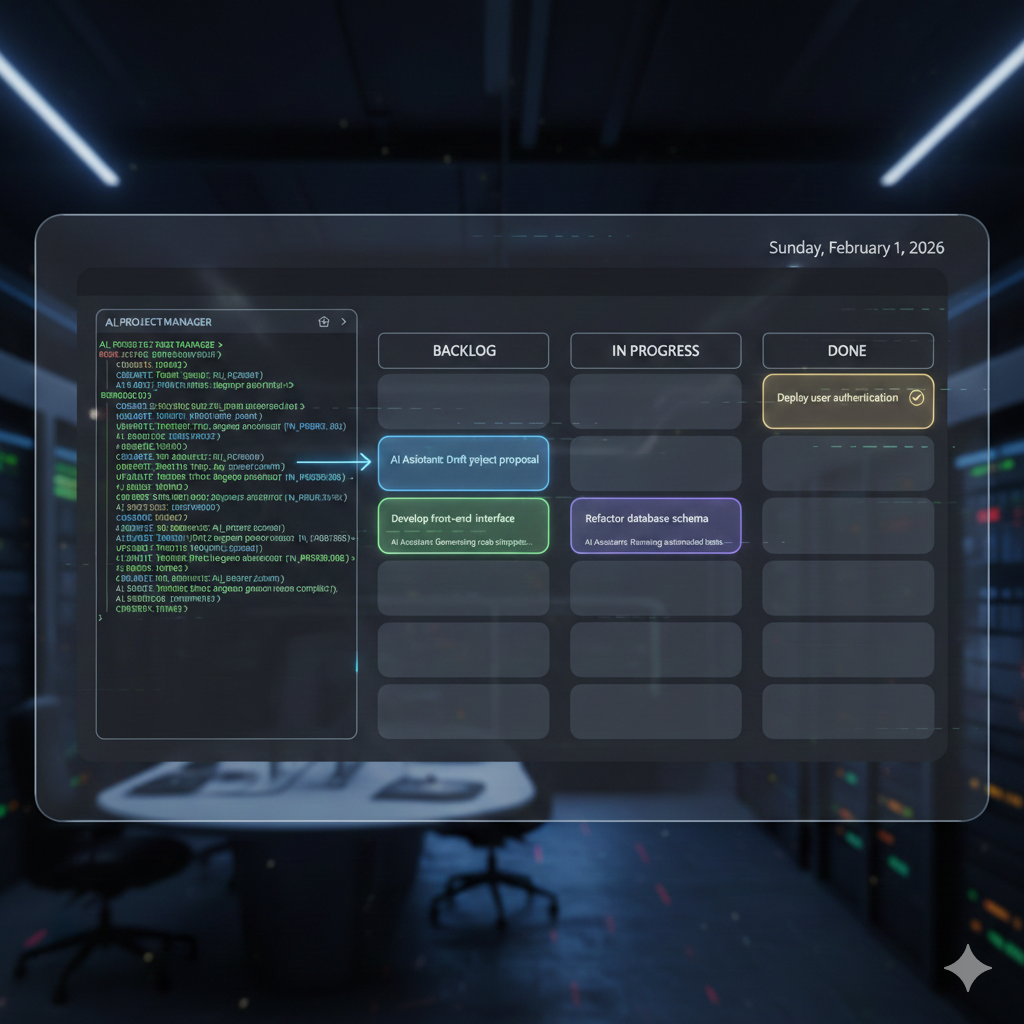
The MCP server exposes your kanban as tools that Claude Code can invoke during development sessions. Here’s a Node.js implementation using the official MCP SDK:
import { Server } from "@modelcontextprotocol/sdk/server/index.js";import { StdioServerTransport } from "@modelcontextprotocol/sdk/server/stdio.js";import {  CallToolRequestSchema,  ListToolsRequestSchema,} from "@modelcontextprotocol/sdk/types.js";import pg from "pg";
const pool = new pg.Pool({  connectionString: process.env.DATABASE_URL,});
const server = new Server(  { name: "kanban-mcp", version: "1.0.0" },  { capabilities: { tools: {} } });
// Define available toolsserver.setRequestHandler(ListToolsRequestSchema, async () => ({  tools: [    {      name: "list_tasks",      description: "List tasks from the kanban board, optionally filtered by project or status",      inputSchema: {        type: "object",        properties: {          project: { type: "string", description: "Project slug to filter by" },          status: { type: "string", description: "Column/status name to filter by" },          limit: { type: "number", description: "Max tasks to return", default: 20 },        },      },    },    {      name: "create_task",      description: "Create a new task on the kanban board",      inputSchema: {        type: "object",        properties: {          project: { type: "string", description: "Project slug" },          title: { type: "string", description: "Task title" },          description: { type: "string", description: "Task description" },          priority: { type: "number", description: "Priority 1-5 (5 is highest)" },          column: { type: "string", description: "Initial column name" },        },        required: ["project", "title"],      },    },    {      name: "update_task",      description: "Update an existing task's status, priority, or details",      inputSchema: {        type: "object",        properties: {          task_id: { type: "string", description: "Task UUID" },          title: { type: "string" },          description: { type: "string" },          priority: { type: "number" },          column: { type: "string", description: "Move to this column" },        },        required: ["task_id"],      },    },    {      name: "search_tasks",      description: "Full-text search across task titles and descriptions",      inputSchema: {        type: "object",        properties: {          query: { type: "string", description: "Search query" },          project: { type: "string", description: "Limit to project" },        },        required: ["query"],      },    },    {      name: "get_task",      description: "Get detailed information about a specific task",      inputSchema: {        type: "object",        properties: {          task_id: { type: "string", description: "Task UUID" },        },        required: ["task_id"],      },    },  ],}));
// Handle tool invocationsserver.setRequestHandler(CallToolRequestSchema, async (request) => {  const { name, arguments: args } = request.params;
  switch (name) {    case "list_tasks": {      const { project, status, limit = 20 } = args as any;      let query = `        SELECT t.id, t.title, t.priority, t.due_date, c.name as status, p.name as project        FROM tasks t        JOIN columns c ON t.column_id = c.id        JOIN projects p ON t.project_id = p.id        WHERE 1=1      `;      const params: any[] = [];
      if (project) {        params.push(project);        query += ` AND p.slug = $${params.length}`;      }      if (status) {        params.push(status);        query += ` AND c.name = $${params.length}`;      }
      params.push(limit);      query += ` ORDER BY t.priority DESC, t.created_at DESC LIMIT $${params.length}`;
      const result = await pool.query(query, params);      return {        content: [{          type: "text",          text: JSON.stringify(result.rows, null, 2),        }],      };    }
    case "create_task": {      const { project, title, description, priority = 3, column = "To Do" } = args as any;
      // Get project and column IDs      const projectResult = await pool.query(        "SELECT id FROM projects WHERE slug = $1",        [project]      );      if (!projectResult.rows.length) {        return { content: [{ type: "text", text: `Project "${project}" not found` }] };      }      const projectId = projectResult.rows[0].id;
      const columnResult = await pool.query(        "SELECT id FROM columns WHERE project_id = $1 AND name = $2",        [projectId, column]      );      const columnId = columnResult.rows[0]?.id;
      // Get next position      const posResult = await pool.query(        "SELECT COALESCE(MAX(position), 0) + 1 as next_pos FROM tasks WHERE column_id = $1",        [columnId]      );      const position = posResult.rows[0].next_pos;
      // Insert task      const insertResult = await pool.query(`        INSERT INTO tasks (project_id, column_id, title, description, priority, position)        VALUES ($1, $2, $3, $4, $5, $6)        RETURNING id, title      `, [projectId, columnId, title, description || "", priority, position]);
      return {        content: [{          type: "text",          text: `Created task "${title}" (${insertResult.rows[0].id})`,        }],      };    }
    case "update_task": {      const { task_id, title, description, priority, column } = args as any;      const updates: string[] = [];      const params: any[] = [];
      if (title) {        params.push(title);        updates.push(`title = $${params.length}`);      }      if (description !== undefined) {        params.push(description);        updates.push(`description = $${params.length}`);      }      if (priority) {        params.push(priority);        updates.push(`priority = $${params.length}`);      }      if (column) {        // Get column ID from task's project        const colResult = await pool.query(`          SELECT c.id, c.is_done FROM columns c          JOIN tasks t ON t.project_id = c.project_id          WHERE t.id = $1 AND c.name = $2        `, [task_id, column]);
        if (colResult.rows.length) {          params.push(colResult.rows[0].id);          updates.push(`column_id = $${params.length}`);
          // Set completed_at if moving to done column          if (colResult.rows[0].is_done) {            updates.push(`completed_at = NOW()`);          } else {            updates.push(`completed_at = NULL`);          }        }      }
      if (!updates.length) {        return { content: [{ type: "text", text: "No updates provided" }] };      }
      params.push(task_id);      await pool.query(        `UPDATE tasks SET ${updates.join(", ")} WHERE id = $${params.length}`,        params      );
      return { content: [{ type: "text", text: `Updated task ${task_id}` }] };    }
    case "search_tasks": {      const { query, project } = args as any;      let sql = `        SELECT t.id, t.title, t.priority, c.name as status,               ts_rank(search_vector, websearch_to_tsquery('english', $1)) as rank        FROM tasks t        JOIN columns c ON t.column_id = c.id        JOIN projects p ON t.project_id = p.id        WHERE search_vector @@ websearch_to_tsquery('english', $1)      `;      const params = [query];
      if (project) {        params.push(project);        sql += ` AND p.slug = $${params.length}`;      }
      sql += ` ORDER BY rank DESC LIMIT 10`;
      const result = await pool.query(sql, params);      return { content: [{ type: "text", text: JSON.stringify(result.rows, null, 2) }] };    }
    case "get_task": {      const { task_id } = args as any;      const result = await pool.query(`        SELECT t.*, c.name as status, p.name as project, p.slug as project_slug,               array_agg(tg.name) FILTER (WHERE tg.name IS NOT NULL) as tags        FROM tasks t        JOIN columns c ON t.column_id = c.id        JOIN projects p ON t.project_id = p.id        LEFT JOIN task_tags tt ON t.id = tt.task_id        LEFT JOIN tags tg ON tt.tag_id = tg.id        WHERE t.id = $1        GROUP BY t.id, c.name, p.name, p.slug      `, [task_id]);
      if (!result.rows.length) {        return { content: [{ type: "text", text: "Task not found" }] };      }
      return { content: [{ type: "text", text: JSON.stringify(result.rows[0], null, 2) }] };    }
    default:      return { content: [{ type: "text", text: `Unknown tool: ${name}` }] };  }});
// Start serverconst transport = new StdioServerTransport();await server.connect(transport);
Configure the MCP server in your Claude Code settings:
{ "mcpServers": { "kanban": { "command": "node", "args": ["./src/mcp-kanban-server.js"], "env": { "DATABASE_URL": "postgresql://user:pass@localhost/kanban" } } }}Gradual migration strategies
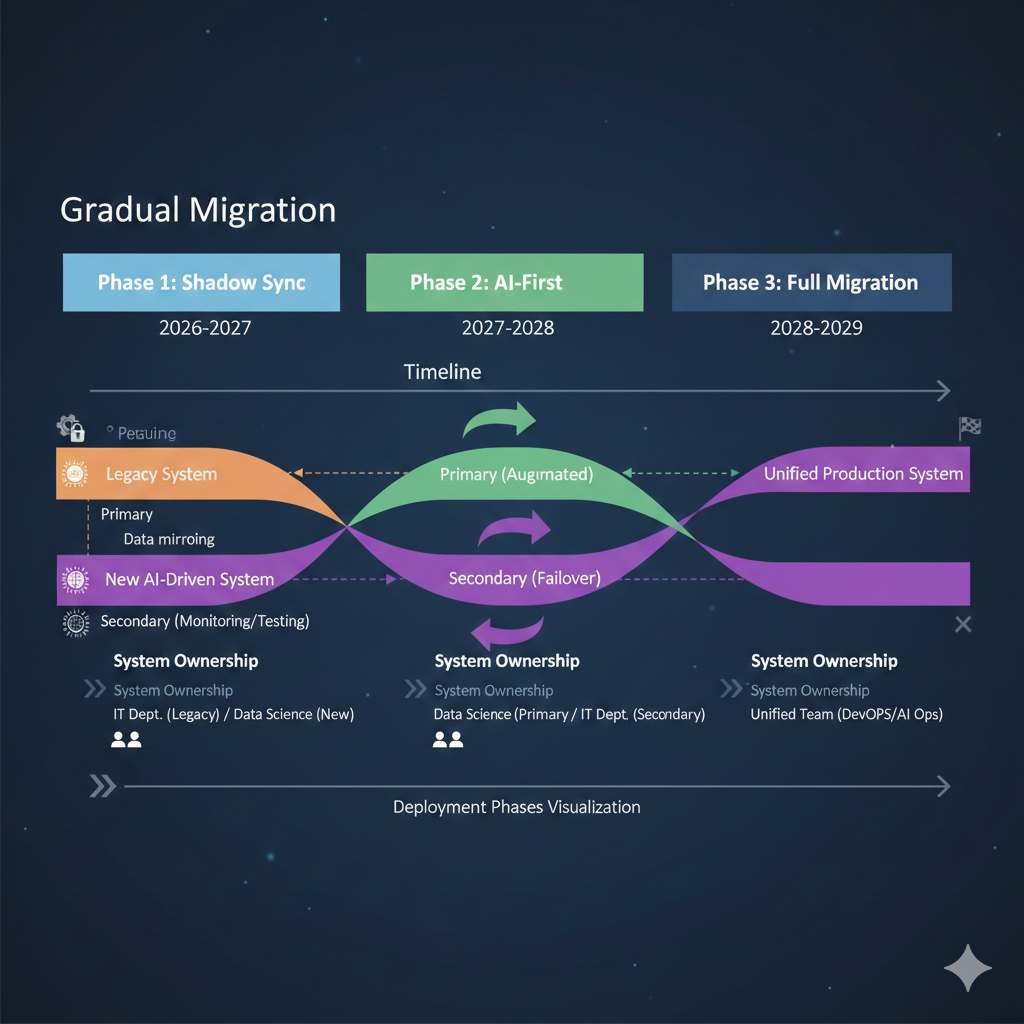
Moving from ClickUp to a custom system doesn’t require a hard cutover. Consider these transition approaches:
Phase 1: Shadow sync (2-4 weeks) Keep ClickUp as the source of truth. Run nightly exports to populate your PostgreSQL database. Use the MCP server for read-only queries during development.
Phase 2: AI-first for new work (4-8 weeks) Create new tasks in your custom system via Claude Code. Continue using ClickUp for team visibility and existing workflows. Sync completed tasks back to ClickUp via API.
Phase 3: Full migration Once comfortable with the custom system’s reliability, migrate remaining active tasks and sunset ClickUp.
def sync_completed_to_clickup(conn, clickup_client):    """Sync tasks completed in custom system back to ClickUp."""    with conn.cursor(row_factory=dict_row) as cur:        cur.execute("""            SELECT id, clickup_id, title, completed_at            FROM tasks            WHERE completed_at IS NOT NULL            AND clickup_id IS NOT NULL            AND clickup_synced_at IS NULL        """)
        for task in cur.fetchall():            clickup_client.update_task(                task["clickup_id"],                {"status": "complete"}            )            cur.execute(                "UPDATE tasks SET clickup_synced_at = NOW() WHERE id = %s",                (task["id"],)            )
    conn.commit()
Key takeaways
Migrating from ClickUp to a custom kanban system is a significant undertaking, but the payoff is substantial for AI-assisted development workflows:
- Export comprehensively: ClickUp’s API provides full access to your data hierarchy; preserve everything during export
- Design for AI queries: PostgreSQL’s full-text search and flexible schema support the natural language queries AI assistants generate
- Build MCP tools thoughtfully: Focus on the operations Claude needs most: listing, creating, updating, and searching tasks
- Migrate gradually: Run systems in parallel to validate reliability before committing fully
- Preserve the bridge: Keep ClickUp IDs in your schema for cross-referencing during transition
The result is a kanban system that feels native to your development workflow. Tasks created, updated, and tracked without leaving your terminal. Full ownership of your project data with the flexibility to extend it however you need.